FUSTSURVIVAL WIKI

Fust Survival Wiki

Last updated:

Fust Survival is a Roblox survival game where you gather resources, craft equipment, build a base and raid other players. Use the Wiki to check crafting requirements, base upkeep, weapons, loot routes and server wipe rules.
Fust Survival official artwork

Game overview

Genre
Survival
Visits
4M+
Favorites
18K+
Creator
Jimma Studios
Release date
2026-10-03
Game updated
2026-11-08

Codes

No codes are currently listed.

The full collection

Explore codes & rewards

Browse all listed codes, check rewards and requirements, and follow the redemption guide.
Getting Started

Getting Started
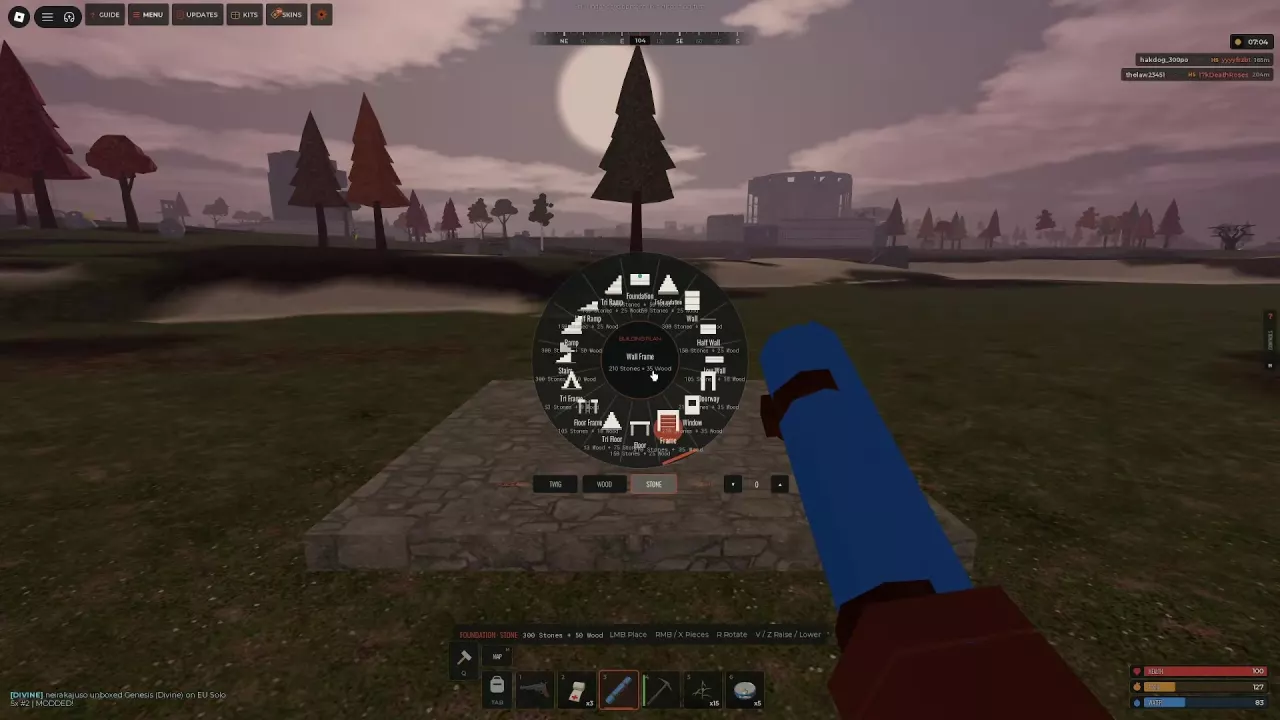
Building Plan wheel with building shapes and Twig, Wood and Stone material choices.

Fust Survival Beginner Guide: From Beach to First Base

  1. Gather basic materials. Use your starting Rock on trees and Stone Nodes, and pick up Hemp for Cloth.
  2. Enclose and secure a small shelter. Add a foundation, walls, a roof and a doorway, then install a door and lock.
  3. Make the base usable. Place a Tool Cupboard and deposit its required upkeep materials. Place a Sleeping Bag before leaving, and store surplus supplies inside.

200 Wood and 100 Stones are Starter Goal milestones, not a complete base budget. The door, Tool Cupboard and Sleeping Bag goals require actual placement; crafting those items alone does not finish them.
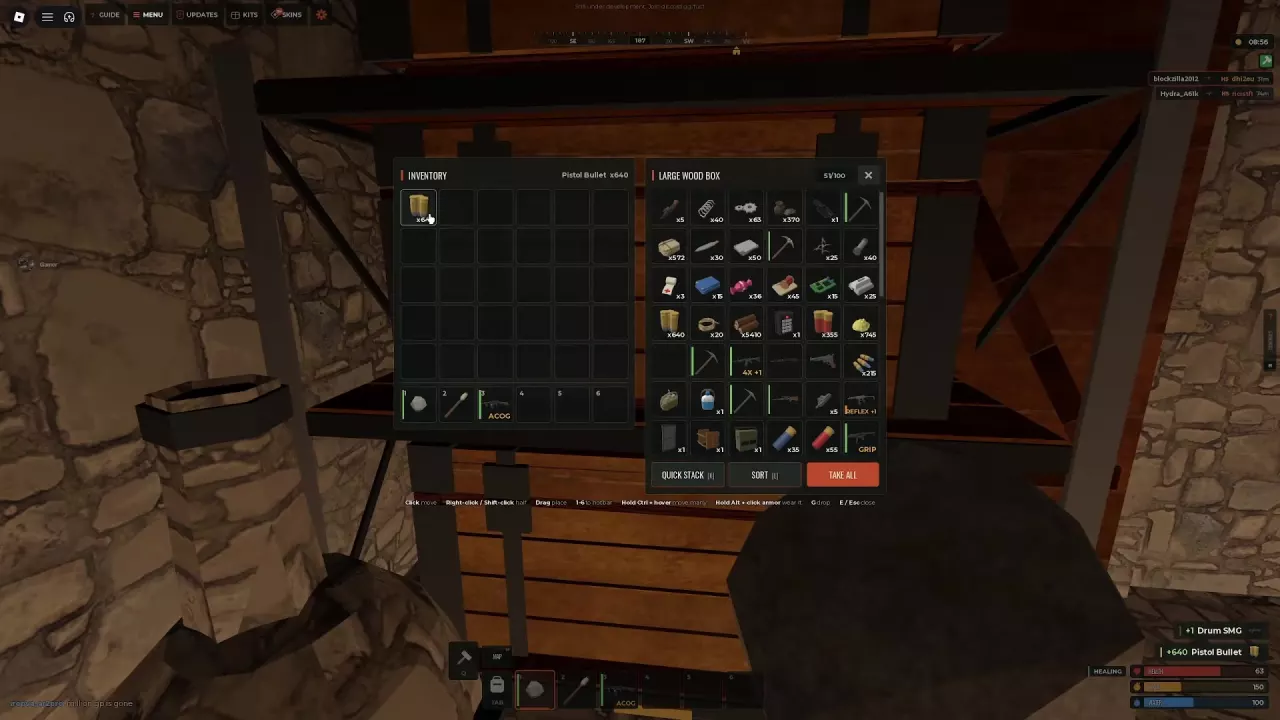
Inventory and Large Wood Box panels with a split stack of pistol bullets.

Fust Survival Controls and Inventory Shortcuts

  • Main panels: Tab opens Inventory, Q opens Crafting and M opens the map. Press P for Settings and keybind changes.
  • World interaction: E uses, opens or collects the targeted object when its prompt offers that action.
  • Open containers: Click to transfer an item; right-click or Shift-click to transfer half a stack. Hold Ctrl and hover over items to transfer several quickly.
  • Personal inventory: Right-click moves an item between inventory and hotbar; Shift-right-click splits a stack. These differ from the half-stack controls in an open container.

Servers & Wipes

Servers & Wipes
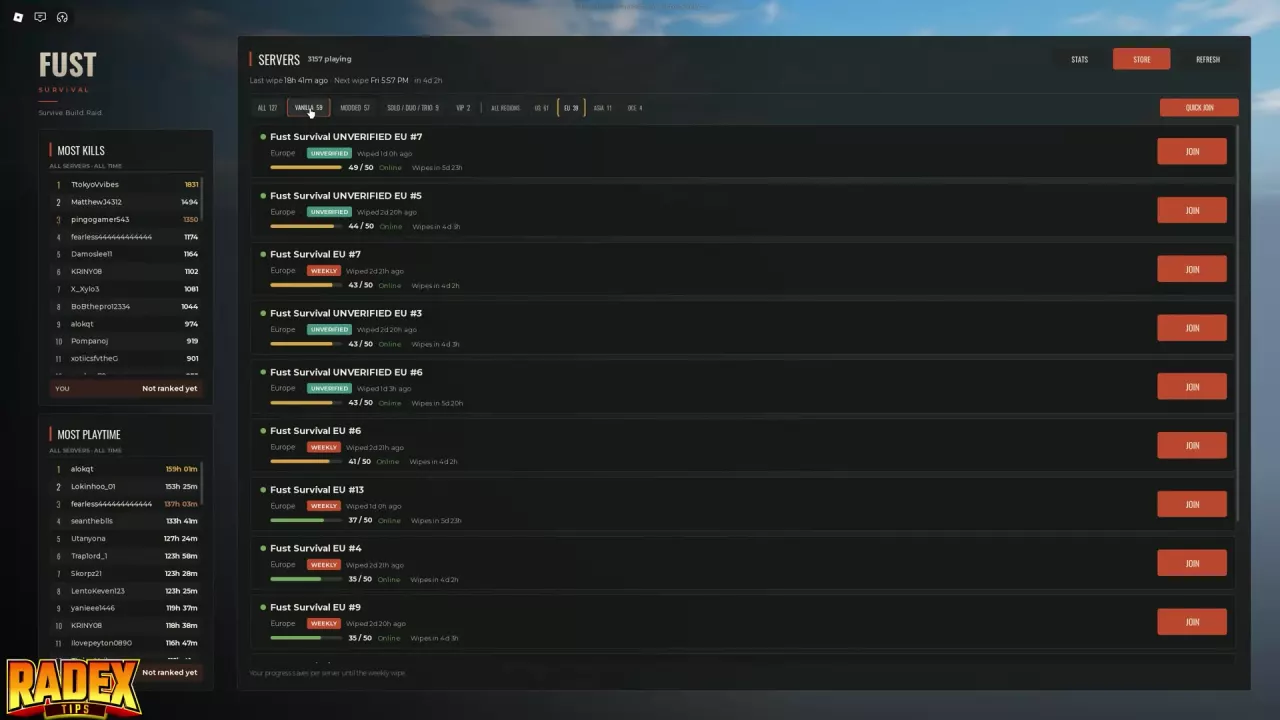
Fust Survival server list with Vanilla and EU filters selected, player counts, wipe countdowns and JOIN buttons.

Fust Survival Servers: Regions, Modes and Joining

Choose a nearby region first, then compare population, mode and the next-wipe countdown before clicking JOIN.

  • Vanilla: Standard resource gathering and equipment progression.
  • Modded: Faster progression for both you and your opponents; quicker access to equipment also means better-equipped enemies can appear sooner.
  • Solo: Each Tool Cupboard permits one authorized player.

Check the server's settings alongside its labels. The listed 5x configuration applies 5x gathering, loot, crafting and stacks; those settings do not establish the settings of every Modded server.

Fust Survival Wipes: Schedule, Saves and Resets

Weekly wipes happen on Friday. Use your selected server's next-wipe countdown to plan your session.
  • Survival progress saves per server. Return to the same server to continue before its wipe.
  • Bases and loot reset. Rebuild and gather supplies again after the wipe.
  • Account-owned Weapon Crates remain across servers and wipes.
  • Purchased kit ownership is permanent. It lets you claim again under the kit's rules; it does not preserve supplies already claimed before the reset.

Survival & Respawning

Survival & Respawning
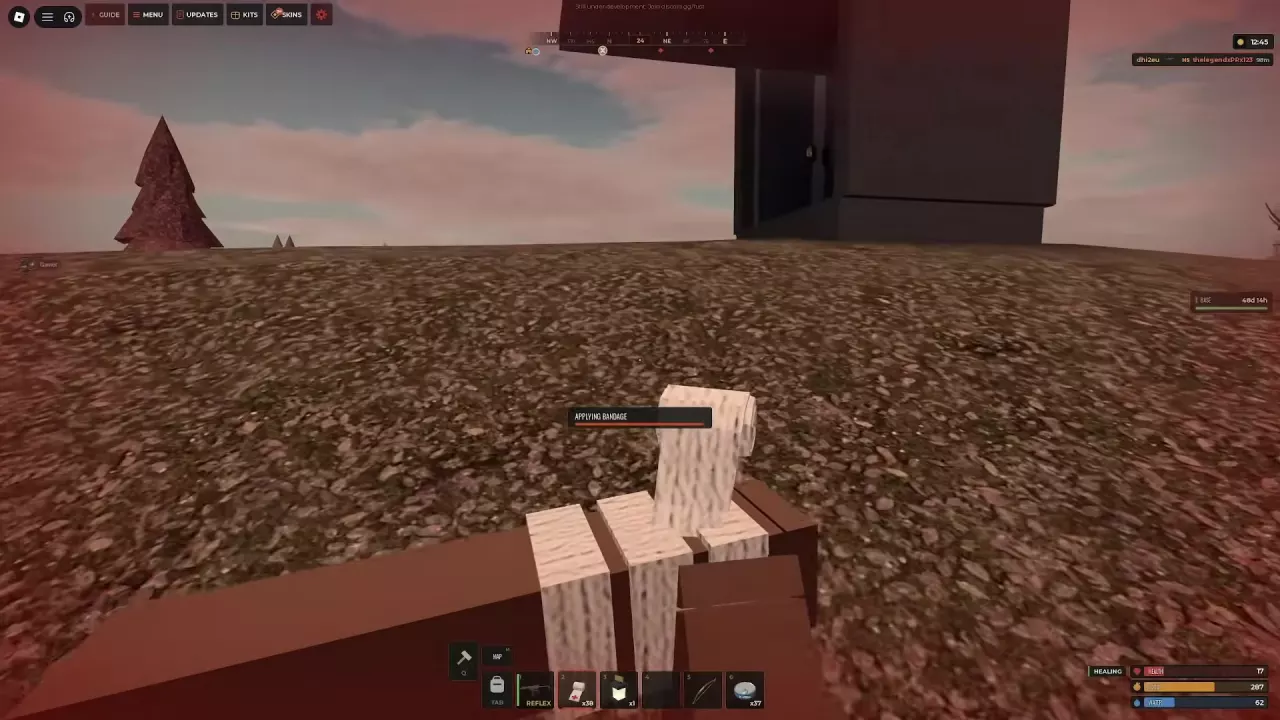
Applying a Bandage with the application progress bar visible.

Fust Survival Food, Water and Healing Guide

  • Bandages: Each costs 4 Cloth, requires no workbench and heals 20 HP. After the 2-second application, you receive 5 HP immediately, then 15 HP over 4 seconds. Stay behind cover while applying it and letting recovery work.
  • Drinking: Stand in fresh water and press E when drinking is available. Salt water gives 8 Water but removes 15 Food, so prefer fresh water when possible.
  • Between fights: Keep Food and Water sufficiently filled to enable slow natural health regeneration.

Fust Survival Sleeping Bags, Respawning and Loot Recovery

  1. Prepare your respawn point. Craft a Sleeping Bag for 30 Cloth, with no workbench required, and place it inside your base.
  2. Choose an available bag after death. Select an entry marked READY. A cooling-down bag must become available before you can use it; beach respawning is a separate option.
  3. Recover both containers. Follow the map's Death marker and search your dropped inventory bag plus any separate wearable backpack nearby. Watch their disappearance countdowns.
  4. Re-equip before fighting. Put armor back on and check matching ammunition. Recovering a gun does not refill it; replenish ammunition and press R to reload.

Resources & Processing

Resources & Processing
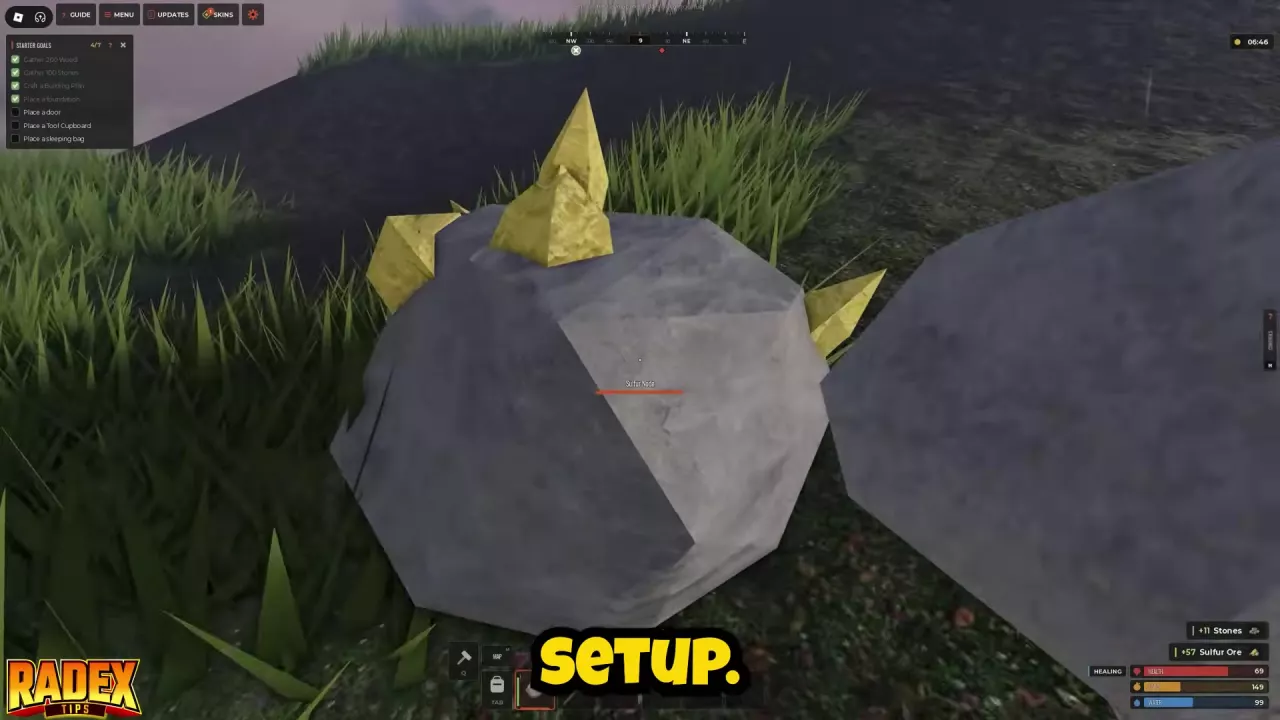
Mining a yellow-crystal Sulfur Node with a Rock, with Stones and Sulfur Ore pickup notifications.

Fust Survival Resources: Sources, Uses and Processing

  • Cloth: Pick up Hemp with E. Reserve some for healing and your Sleeping Bag before spending it on equipment.
  • Scrap: Search crates, defeated enemies and loose pickups, or recycle surplus components at Outpost.
  • Metal Fragments: Smelt Metal Ore in a Furnace or collect ready-to-use fragments from loot.
  • Components: Before recycling, reserve 2 Metal Springs and 2 Metal Pipes if you intend to use the 10x WB1 Revolver recipe.
  • Ore and processed materials: Keep their names separate when checking recipes. Sulfur Ore is not Sulfur, and High Quality Metal Ore is not High Quality Metal.
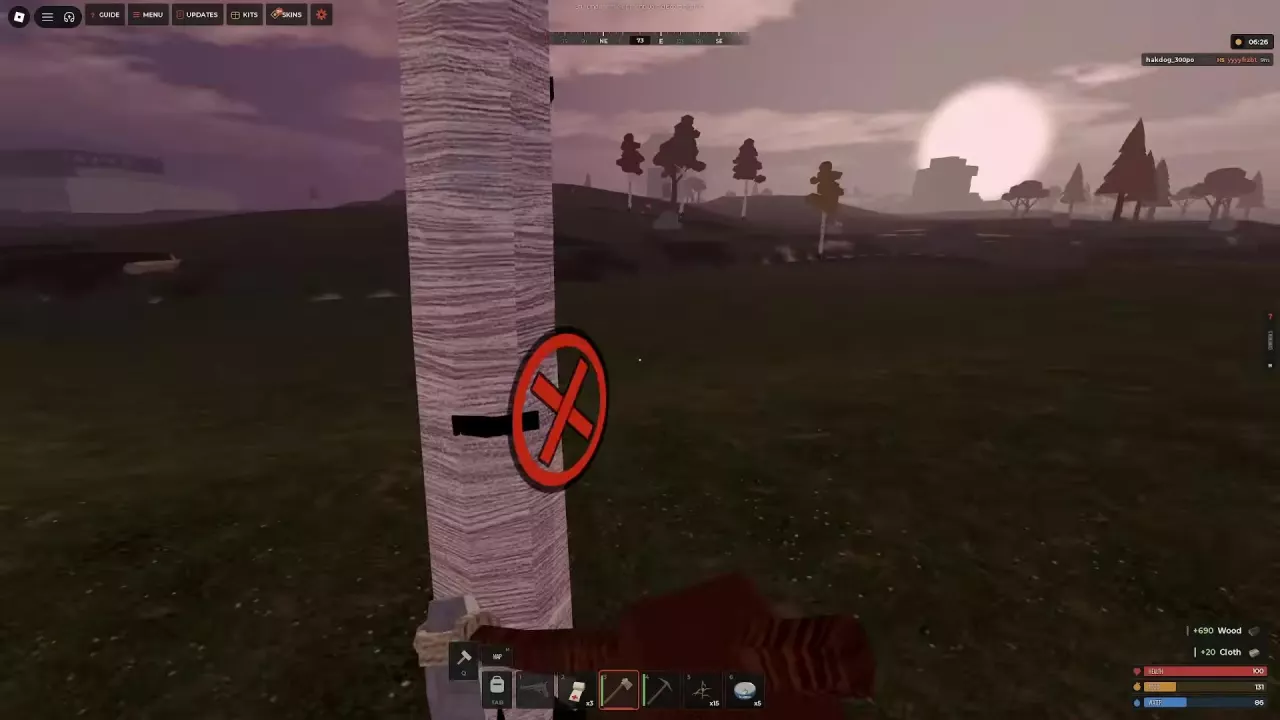
A red weak-spot marker on a tree while a player holds a hatchet.

Fust Survival Gathering Tools and Weak-Spot Farming

Start with the Rock, then specialize for the resource you need. Keep striking marked weak spots, such as the red X on a tree, to break gathering targets faster.
  • Wood: Prioritize a Stone Hatchet. Its gathers trees ×2 property belongs to the tool and is separate from the server's gathering multiplier.
  • Stones and ore: Use a pickaxe when you obtain one; your Rock can handle starting Stone and Sulfur Nodes.
  • Worn tools: A Rock can become BROKEN. Repairing worn tools costs materials and lowers maximum durability, so replacing it with a suitable upgrade can be a better investment.
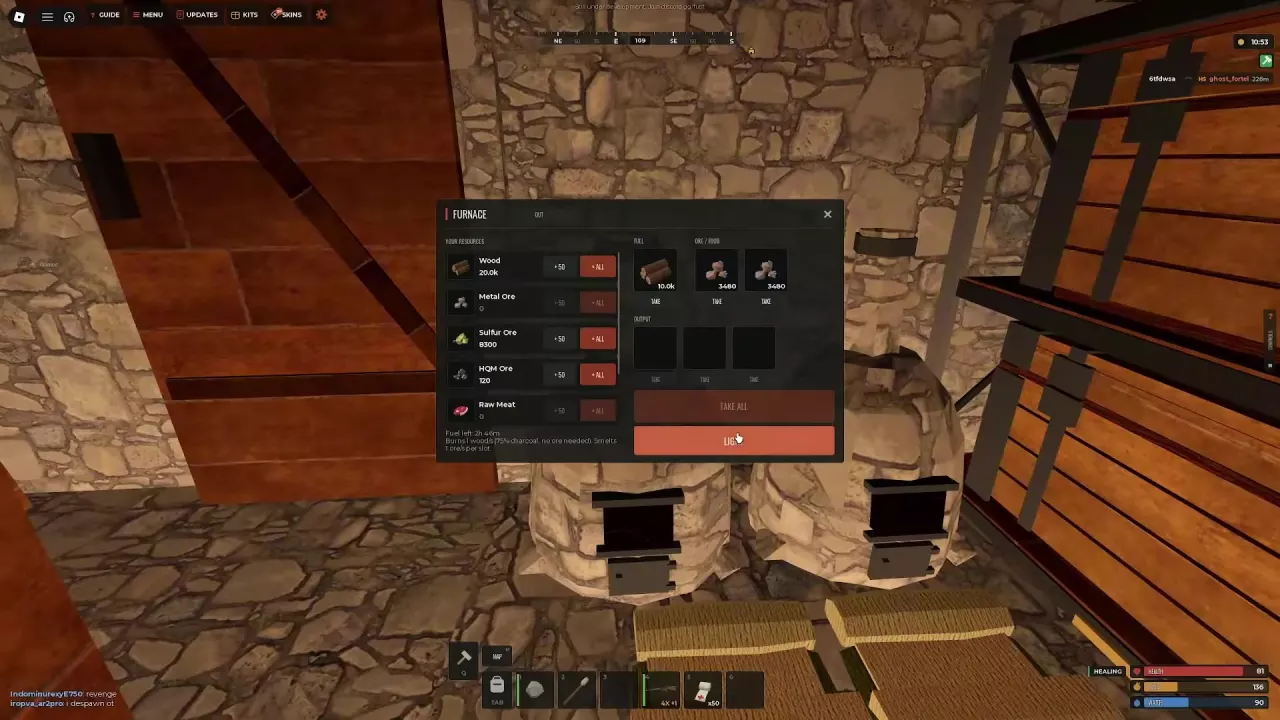
Furnace interface with Wood, two loaded ore slots, output slots and the LIGHT button

Fust Survival Furnace Guide: Smelting, Fuel and Charcoal

  1. Load the Furnace. Put Wood in FUEL and ore in the two ORE / FOOD slots.
  2. Select LIGHT. Collect processed materials from OUTPUT with TAKE or TAKE ALL.

In the 10x Furnace configuration, each supplied ore slot processes 1 ore per second, while fuel consumption is 1 Wood per second. Both slots together process 2 ores per second while both remain supplied; split ore evenly to reduce idle-slot time.

Wood keeps burning even when no ore remains. A Wood-only burn can produce Charcoal, but leaving the Furnace lit after processing also continues consuming fuel.
Crafting & Workbenches

Crafting & Workbenches
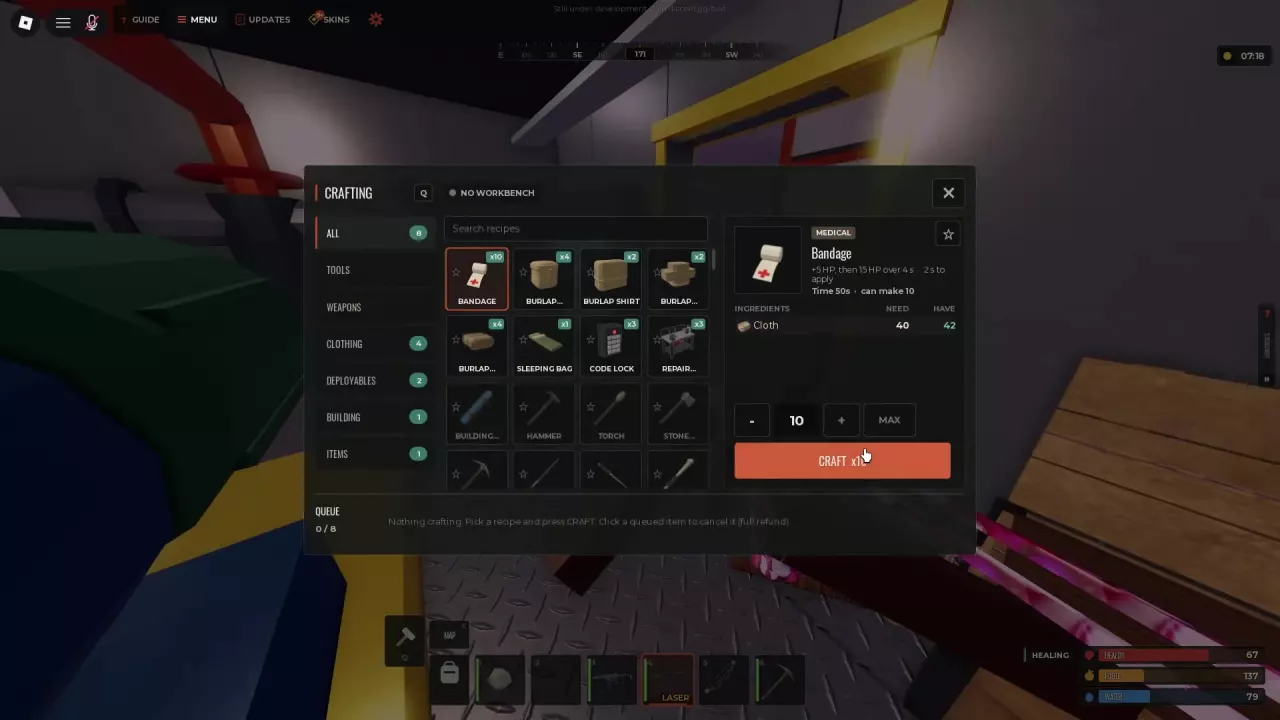
A batch of ten Bandages requiring 40 Cloth with a displayed crafting time of 50 seconds.

Fust Survival Crafting, Workbench Levels and Repairs

Press Q, select a recipe, meet its material and workbench requirements, choose a quantity and click CRAFT.
  • Queue: There are 8 batch slots; one batch can contain more than eight items. INVENTORY FULL pauses output until you free space.
  • Quickcraft: Star recipes in Crafting. Favorites appear in Quickcraft when you carry enough materials.
  • Workbench Level 1: The 10x recipe costs 600 Wood and 150 Metal Fragments. Place it and stay within its 12-stud crafting range for Level 1 recipes.
  • Repairs: Repair Bench repairs to worn tools and melee weapons consume materials and reduce the item's maximum durability.

Base Building & Defense

Base Building & Defense
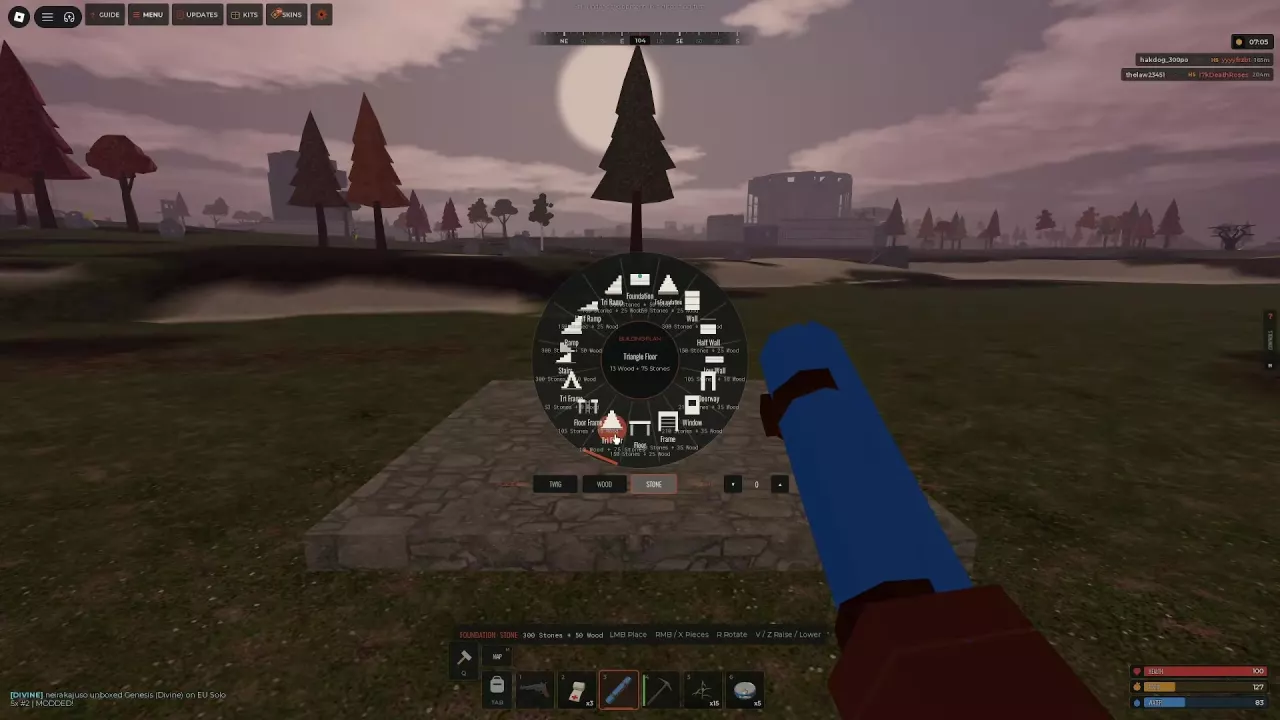
Building Plan wheel with building shapes and Twig, Wood, and Stone material choices.

Fust Survival Building Guide: Pieces, Costs and Upgrades

Craft a Building Plan for 20 Wood, with no workbench required, then equip it from your hotbar.
  • Choose and place: Open the shape and material wheel with RMB or X. Left-click to place, press R to rotate, and use V/Z to adjust foundation height.
  • Close the roof: Use Floor over a square opening and Triangle Floor over a triangular opening. Aim above supporting walls.
  • Strengthen individual pieces: Equip a Hammer, target the piece and open its upgrade menu with RMB. Pay the cost for that specific piece and selected grade; placement and upgrade costs are separate.
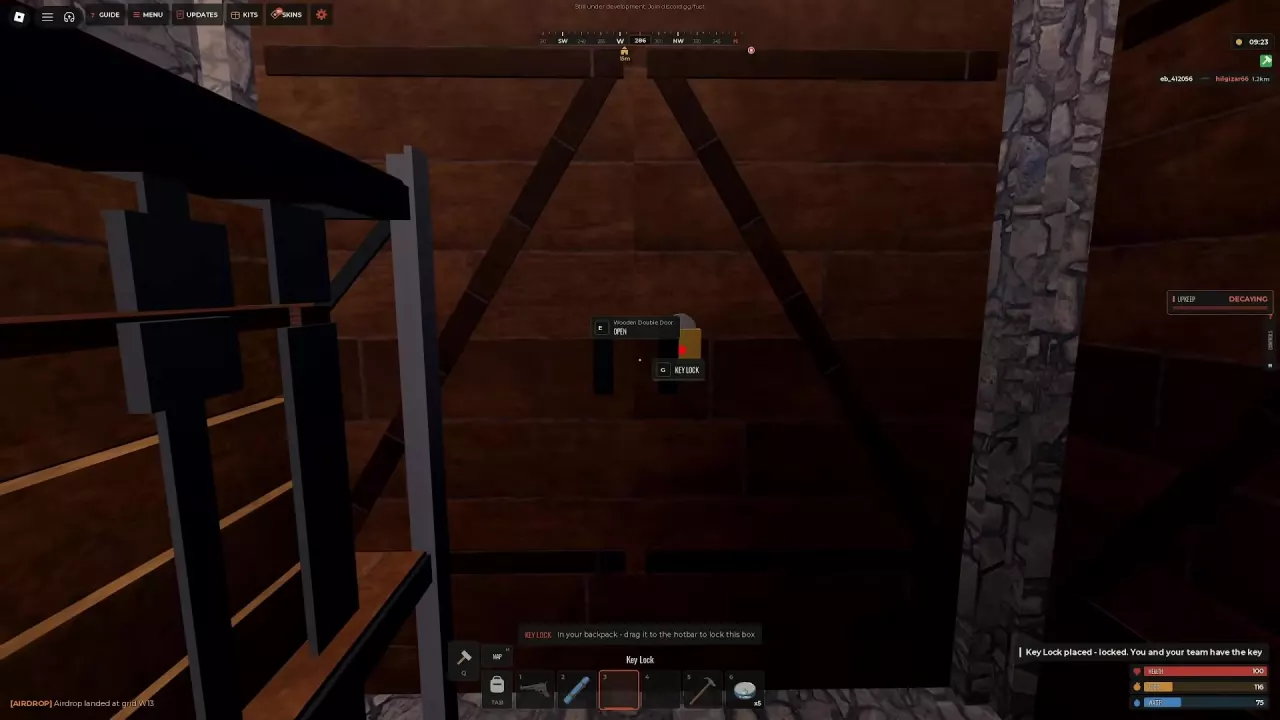
Key Lock attached to a Wooden Double Door with locked-placement confirmation.

Fust Survival Doors, Locks and Base Defense

  • Match the opening: A Wooden Door fits a Doorway. Wooden Double Doors and Sheet Metal Double Doors fit a Wall Frame. Equip the door, aim at its opening and left-click to install it.
  • Lock the entrance: A Key Lock costs 75 Wood and starts locked when attached. You and your team automatically receive key access; only the lock owner can manage it.
  • Add an airlock: Enclose a second-door entrance space between outdoors and the main room. Pass through one door, close it behind you, then open the next. Leaving both doors open removes that separation.
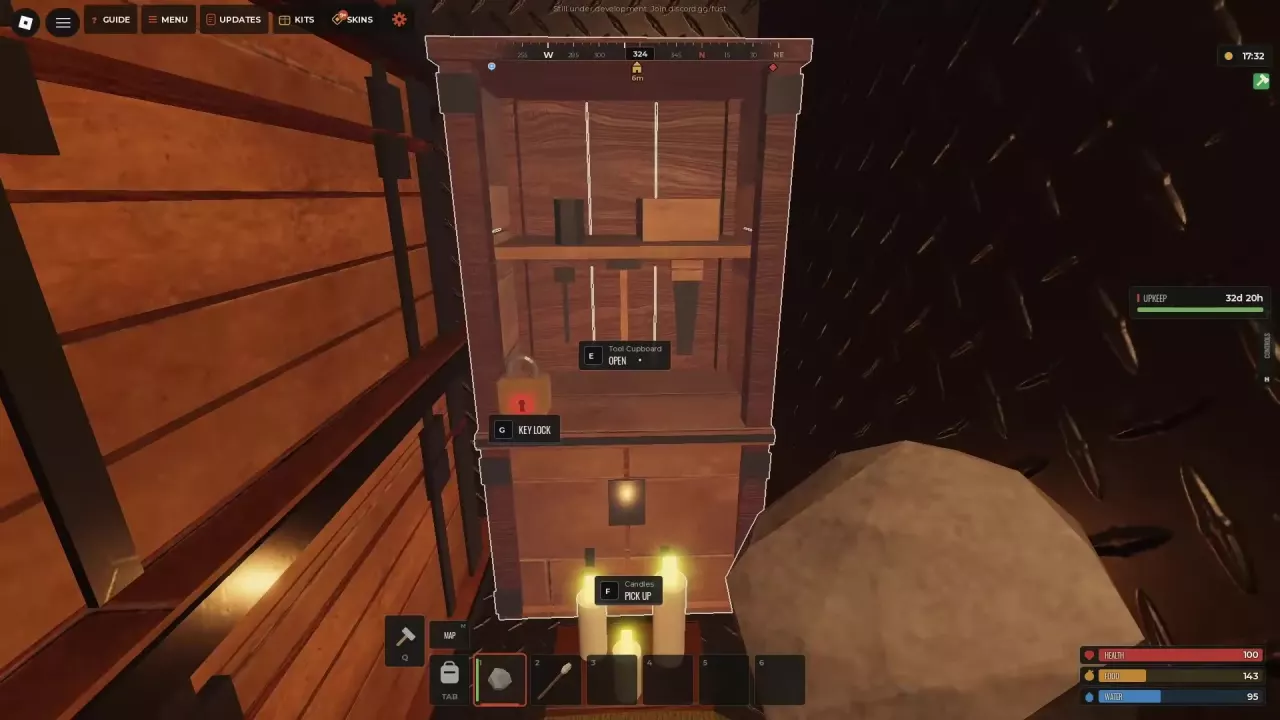
A locked Tool Cupboard with separate E Open and G Key Lock prompts.

Fust Survival Tool Cupboard: Upkeep, Authorization and Repair

  • Pay upkeep: Open the TC with E and deposit every material listed under PER DAY. Read PROTECTED FOR to see the duration covered by its current stock. Recheck after expanding, upgrading or withdrawing materials.
  • Manage authorization separately: Having the key or opening TC storage does not authorize base upgrades. Check AUTHORIZED PLAYERS and use AUTHORIZE; Solo servers allow one authorized player per cupboard.
  • Read the correct status: DECAYING calls for replenishing upkeep. REPAIR PAUSED · RAID means automatic repairs are temporarily paused—follow its recovery countdown even if upkeep protection remains active.

Inventory & Storage

Inventory & Storage

Fust Survival Storage Boxes and Shelf Layouts

Shelves have three levels, each fitting two small boxes or one large box.

Box Slots per box Full three-level layout Total box slots
Wood Storage Box 18 Six boxes 108
Large Wood Box 100 Three boxes 300

These totals are storage across the mounted boxes. You can mix box sizes on different levels.

Separate clothing and armor, weapons and tools, and resources into different boxes. Fit Key Locks to secure them, and leave walking space to reach your supplies.
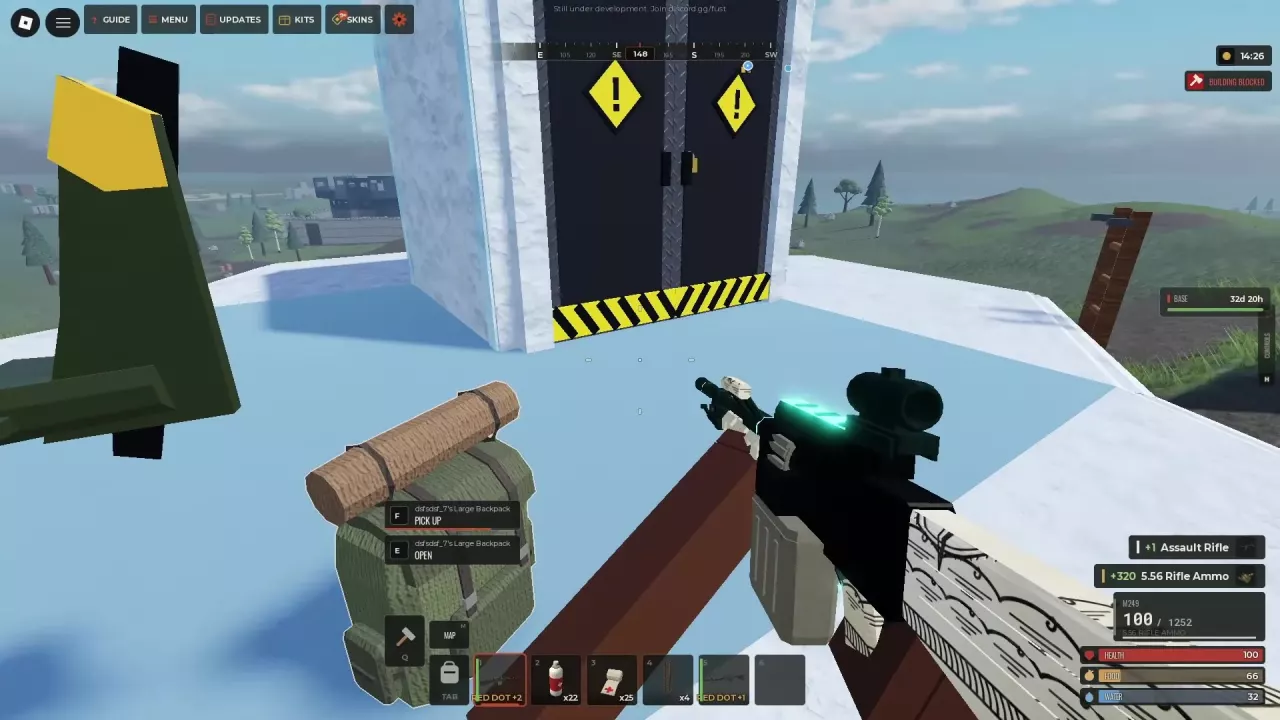
A ground Large Backpack displaying F Pick Up and E Open prompts.

Fust Survival Backpacks: Sizes, Equipping and Pickup Fixes

Small Backpack adds 12 slots; Large Backpack adds 50. Equip one in the BACKPACK slot, then click that slot to open its separate storage and move supplies into it.

  • E OPEN on a ground backpack: Inspect and take its contents.
  • F PICK UP: Collect the backpack itself.
  • Asked to empty it first? Open it, scroll to the bottom and remove everything before retrying F. Items below the visible rows can prevent pickup.

A dropped inventory bag and a wearable backpack can be separate containers, so search both when recovering belongings.
Weapons & Combat

Weapons & Combat
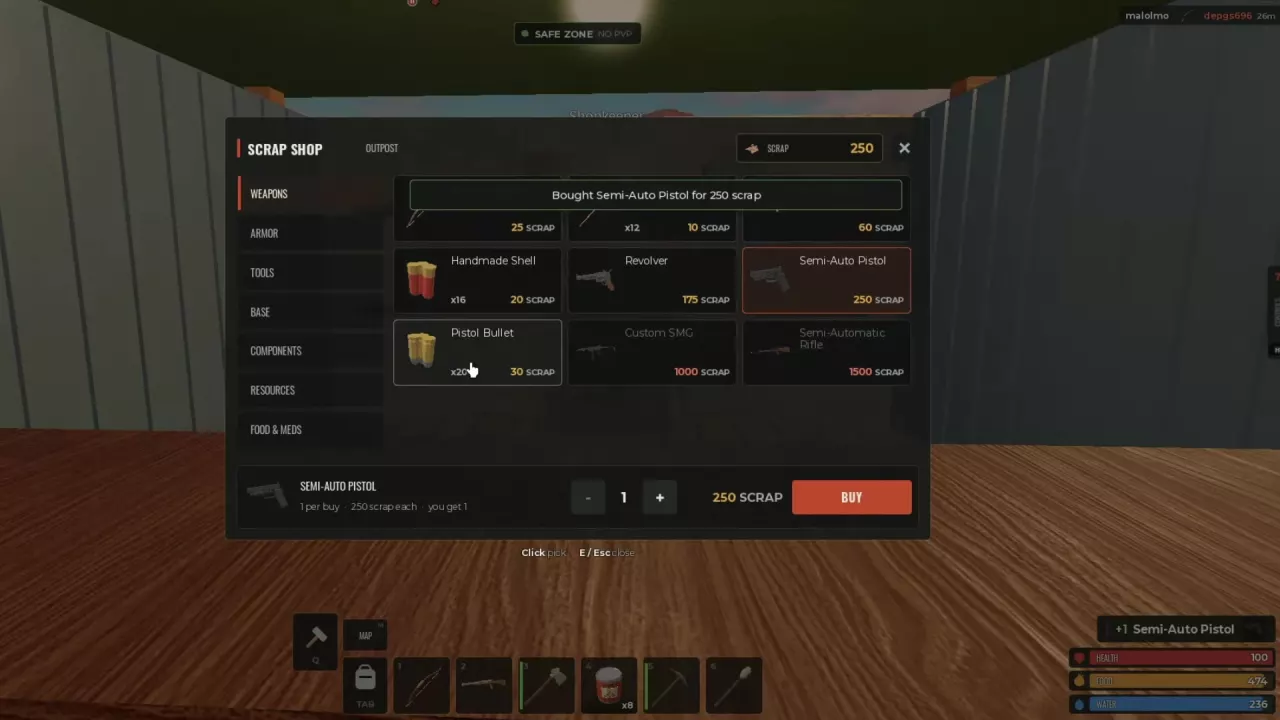
Outpost Scrap Shop confirming a Semi-Auto Pistol purchase for 250 Scrap.

Fust Survival Weapons: Guns, Bows and Acquisition

A Hunting Bow can start your Guard fights before you have a workbench. Prepare Wooden Arrows separately, then search defeated Guards and crates for guns and compatible ammunition.

These crafting requirements apply to the 10x server recipes:

Weapon Materials Workbench
Hunting Bow 200 Wood + 50 Cloth None
Revolver 500 Metal Fragments + 2 Metal Springs + 2 Metal Pipes Level 1

Equip and load a newly acquired gun before relying on it. Finding the weapon alone does not supply the ammunition needed to fire.
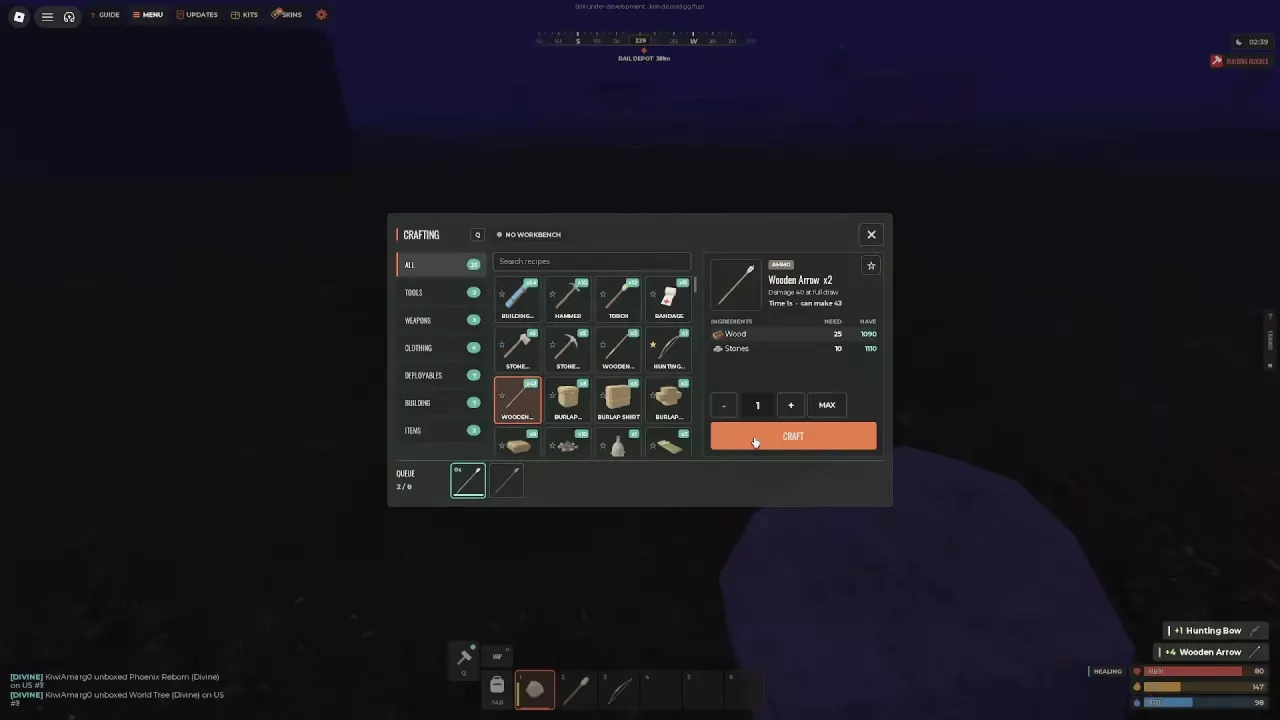
Wooden Arrow crafting menu with ingredients, batch controls, and arrows in the queue.

Fust Survival Ammo Chart, Crafting and Resupply

  • Wooden Arrow: Hunting Bow, Compound Bow and Crossbow.
  • Pistol Bullet: Revolver, Service Pistol, Semi-Auto Pistol, Custom SMG, Tactical SMG and Drum SMG.
  • Standard 5.56 Rifle Ammo: Assault Rifle, Bolt Action Rifle, LR Sniper Rifle, M249, SCAR and Semi-Automatic Rifle.
  • Handmade Shell: Pipe Shotgun.

HV 5.56 trades 15% less damage for 1.5× normal bullet speed, with less lead and bullet drop. Favor that trajectory advantage for distant shots when it helps you land hits. Check special ammunition separately rather than assuming the standard 5.56 compatibility list applies to it.
Armor & Clothing

Armor & Clothing
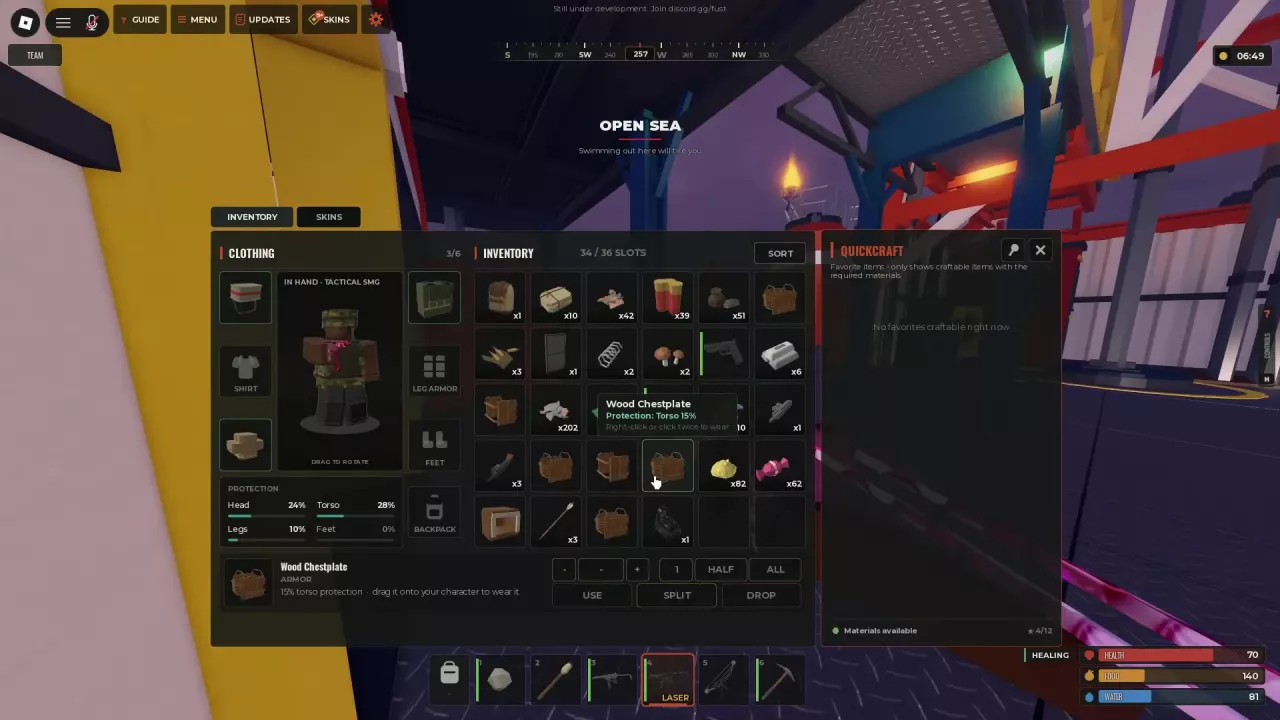
Inventory with separate clothing and armor slots and Wood Chestplate wear instructions.

Fust Survival Armor: Clothing, Protection and Layering

Compare individual pieces covering the same body region:

Region Item Individual protection
Head Coffee Can Helmet 24%
Head Burlap Headwrap 10%
Torso Road Sign Jacket 25%
Torso Wood Chestplate 15%

SHIRT and CHEST are separate slots, as are PANTS and LEG ARMOR, so compatible clothing can remain under armor. Replacing an occupied slot swaps the existing item rather than adding another layer.

After changing gear, read the affected region in the outfit's PROTECTION panel. An outfit total is different from a single item's protection value.

Modded Weapon Tier List

Modded Weapon Tier List

Fust Survival Weapon Tier List for Modded Combat

For Modded combat with matching ammunition and basic equipment available, Assault Rifle is the S-tier all-around pick for varied encounters.
  • Repeated nearby fights: Tactical SMG's 30-round magazine provides six more shots before reloading than Custom SMG's 24. Both are A-tier choices using Pistol Bullet.
  • Deliberate distant shots: Choose the A-tier Semi-Automatic Rifle with a 4x scope and a position that lets you withdraw into cover.
  • Larger firing reserve: The A-tier Drum SMG recommendation applies to the 10x ACOG loadout with 50 loaded rounds, rather than every configuration.
  • Rooftop pressure: Use M249 beside cover. In the 5x rooftop setup, stop jumping if CAN'T SHOOT WHILE JUMPING appears.

Map & Monuments

Map & Monuments
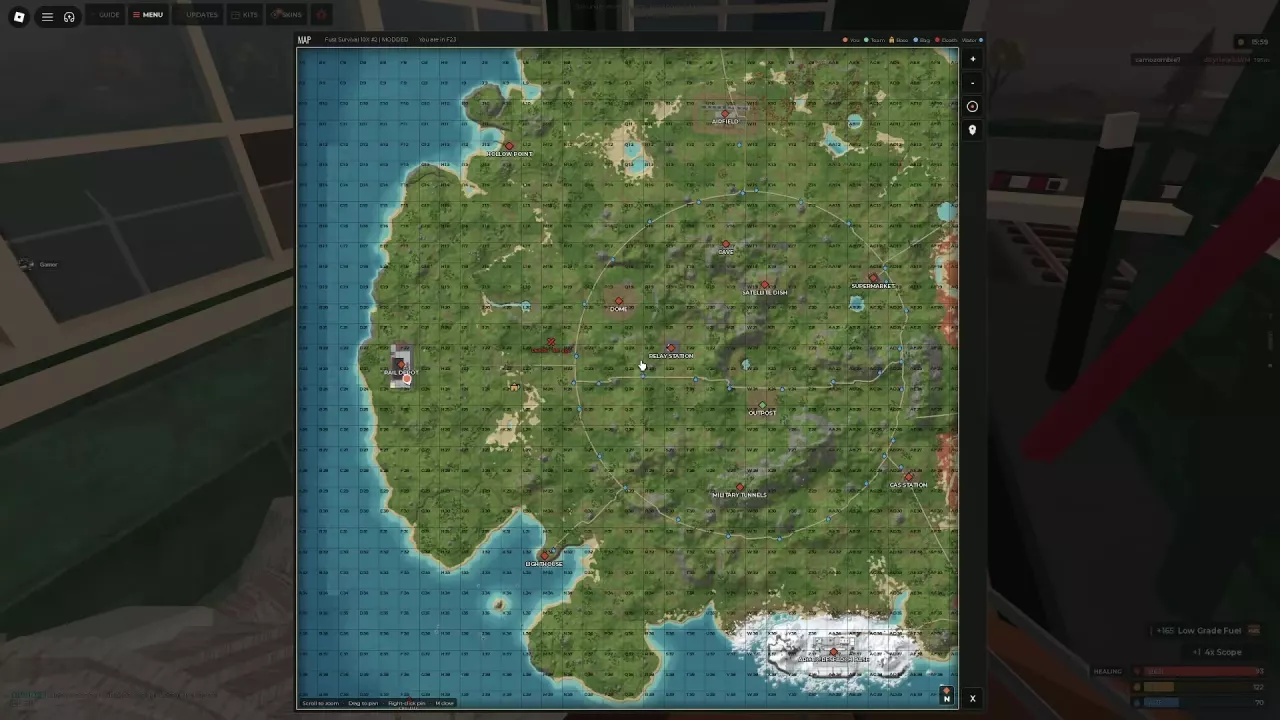
Map with grid coordinates, monument labels, player and base markers, and the marker legend.

Fust Survival Map and Monument Guide

Press M, locate your You marker and right-click a destination to mark it. Close the map and follow the compass direction and distance. Follow the house marker when returning to base.

Outpost is a safe zone with no PvP or building. Visit it for the Scrap Shop and Recycler; internal stall signs and directional boards help you find services.

Choose other destinations around your supplies: Dome offers a focused Military Crate route, railway sites involve Guard fights, and Oil Rig needs preparation for an offshore trip and return.

Fust Survival Dome Military Crate Route

  1. Climb Dome's ramp. At the end, turn right.
  2. Continue past the ladder. Find and search the exterior Military Crate.
  3. Keep going straight. Enter through the opening on the left and search inside for two more Military Crates.

Leave carrying space before setting out. Other players can attack on the approach, and the crates' contents are not fixed.
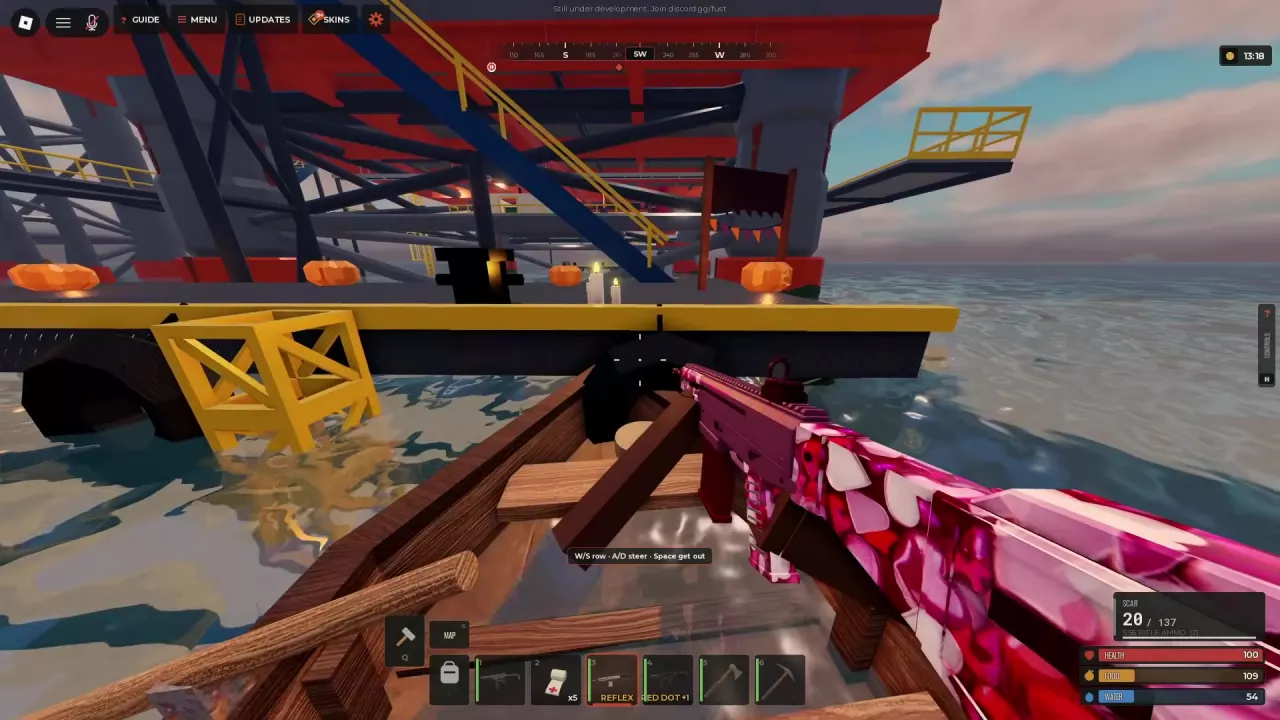
Rowboat beside Oil Rig's lower landing, with stairs leading up into the structure.

Fust Survival Oil Rig Guide: Boarding, Loot and Extraction

  1. Bring a boat and combat supplies. Pack matching ammunition, healing and carrying space. Land beside the lower platform and climb the stairs.
  2. Clear before crossing. Check Guards above the landing, beside buildings and along walkways before moving between platforms.
  3. Reach CONTROL. Start the Locked Crate's hack when available, then search upper platforms and the helipad while waiting. Return for the unlocked crate.
  4. Extract by boat. Leave CONTROL past the containers and crane, follow the stairs down and board at the lower landing.

Keep your return boat available: swimming in Open Sea causes fatigue.

NPCs

NPCs

Fust Survival NPCs: Guards, Soldiers and Scarecrows

  • Guards: Armed enemies at Rail Depot, Trainyard and Oil Rig. Bring a ranged weapon, matching ammunition and healing supplies.
  • Soldiers: Hostile NPCs around the Military Tunnels entrance and corridors. Use walls and corners to reload and heal between encounters.
  • Scarecrows: Attackable targets that can be damaged with a held weapon.

After defeating a Guard or Soldier, approach the body and press E LOOT. Take useful supplies or use TAKE ALL with room available, and watch the disappearance countdown. Loot can replenish equipment and ammunition, but contents differ between bodies.
Loot Crates

Loot Crates
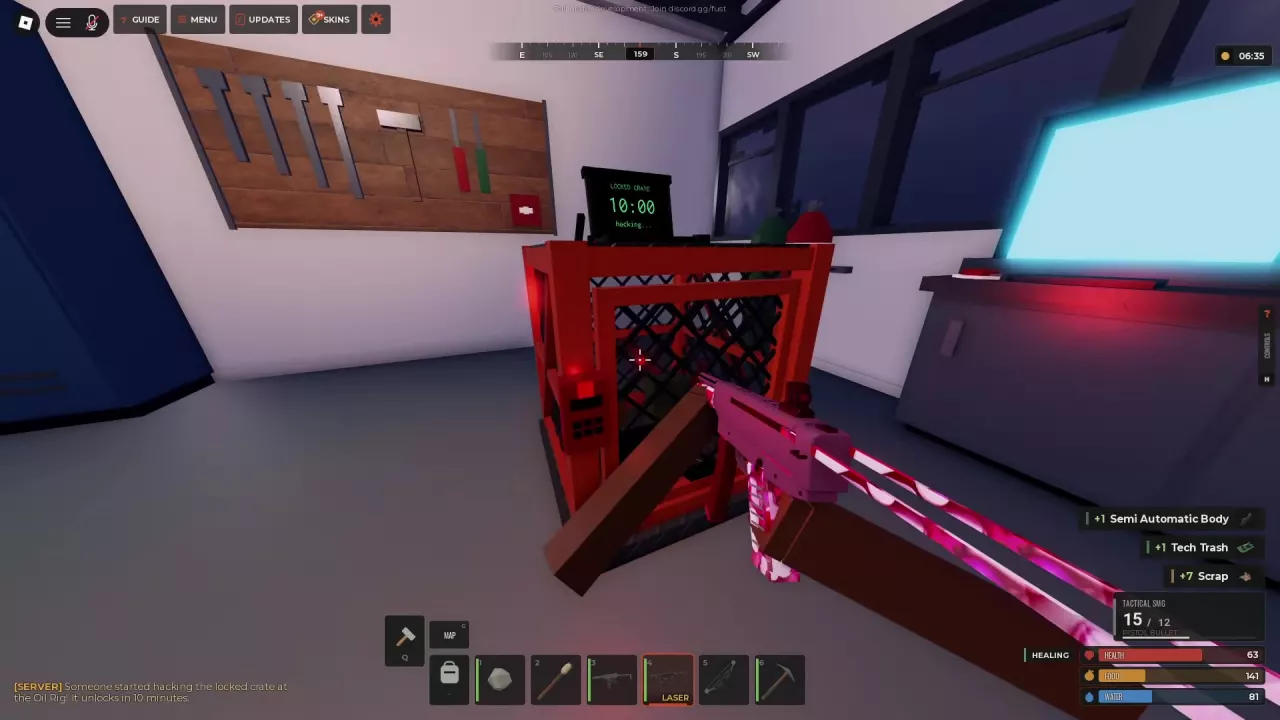
Oil Rig Locked Crate displaying a 10:00 hacking countdown.

Fust Survival Loot Crates: Locations, Contents and Hacking

Approach ordinary containers and press E at OPEN or LOOT, then transfer items individually or use TAKE ALL. If full, free inventory slots or move supplies into an equipped backpack's separate storage.

For Oil Rig's Locked Crate:
  • Ready to hack: Press E at START HACKING. Unlocking takes 10 minutes and broadcasts your activity to the server.
  • COOLDOWN / next hack: Wait until another hack can start; this is separate from the active hacking timer.
  • UNLOCKED: Loot directly without starting another hack.
  • Disappears in: The loot window's deadline for collecting contents, separate from either hacking timer.

Raiding

Raiding
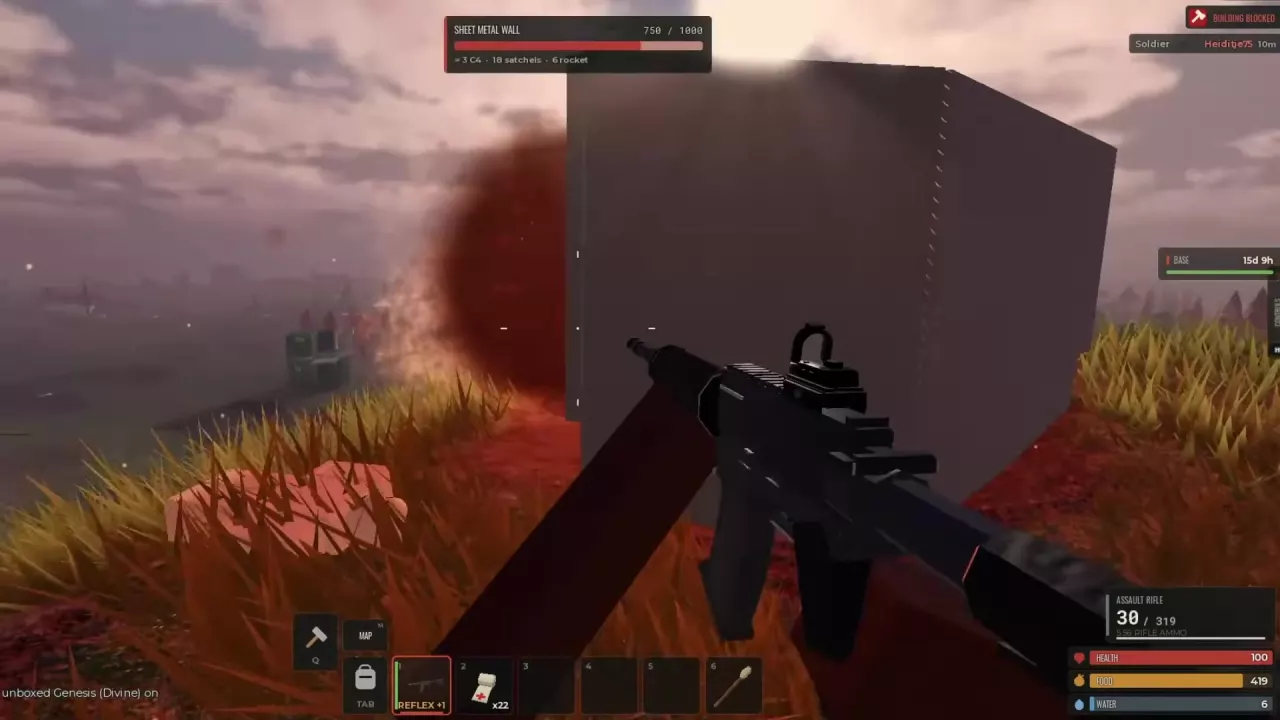
Damaged Sheet Metal Wall at 750/1000 HP with approximate C4, satchel and rocket requirements.

Fust Survival Raiding Guide and Conditional Raid Costs

For these 5x targets at 1,000/1,000 HP, the targeting prompts give approximate alternatives:

Target C4 Satchels Rockets
Sheet Metal Double Door ≈2 ≈6 ≈3
Sheet Metal Wall ≈4 ≈23 ≈8

Each column is a separate explosive option. If both provide equivalent access, the door costs less, but count every additional barrier requiring an independent breach. Re-read estimates after damage.

Timed Explosive Charge has a 10-second fuse after attachment. Move back and let placed charges detonate before deciding to add more. Opening and looting a TC does not automatically grant building-upgrade authorization.

Vehicles

Vehicles

Fust Survival Vehicles: ATV, Rowboat and Minicopter

  • ATV for land: Look around Dome for an available vehicle. Watch its fuel gauge during the trip.
  • Rowboat for sea: Search the coast near the rig, or try the area to the left of Lighthouse. Press E at SIT to board.

Once seated in an ATV or Rowboat, use W/S to move, A/D to steer and Space to get off. The suggested search areas do not guarantee an available vehicle.

Keep the boat for your return from Oil Rig. Open Sea swimming causes fatigue, so plan both crossings before heading upstairs to loot.
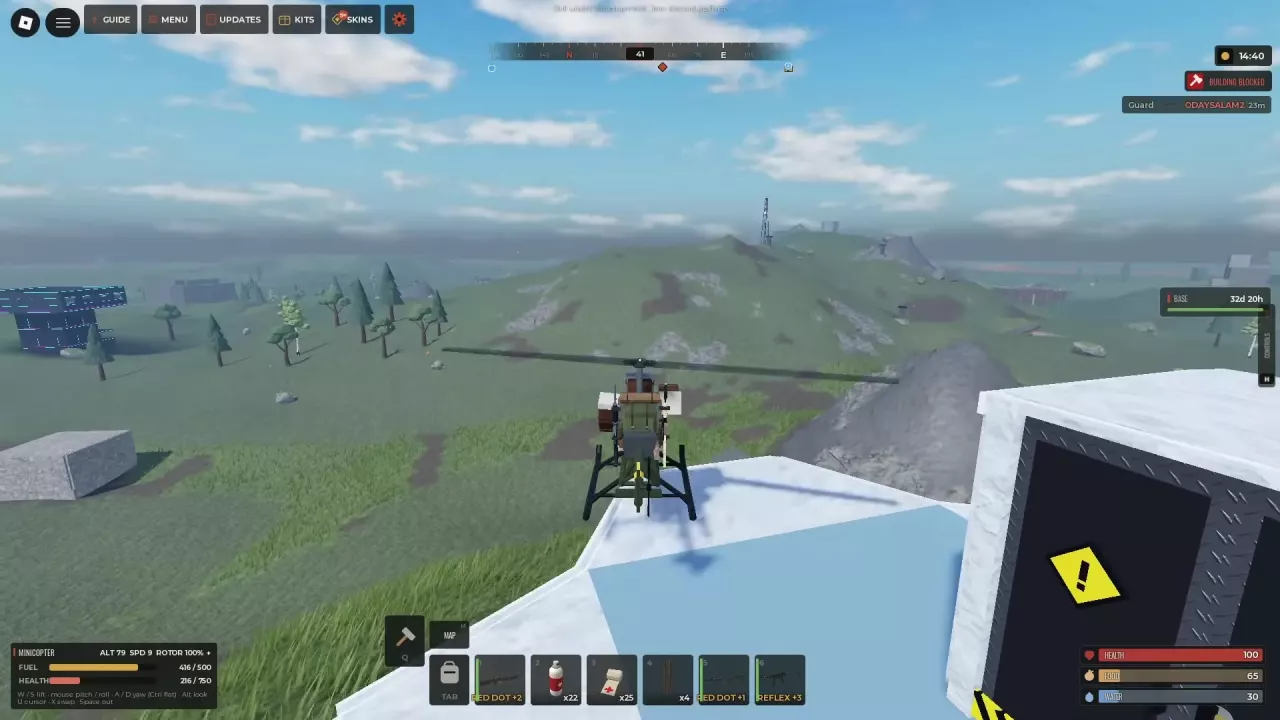
Minicopter lifting off from a rooftop with its flight HUD visible

Fust Survival Minicopter Flight Controls

Press E at FLY to enter the pilot position.

  • W/S: Control lift.
  • Mouse: Adjust pitch and roll.
  • A/D: Yaw to change heading.
  • Ctrl: Level flight.
  • F / K: ADD FUEL / TAKE FUEL at the aircraft.

Fuel decreases during flight, so monitor FUEL alongside altitude, speed and vehicle HEALTH. The pilot can take damage from gunfire while airborne; check surrounding threats when departing a rooftop.
Scrap Shop

Scrap Shop
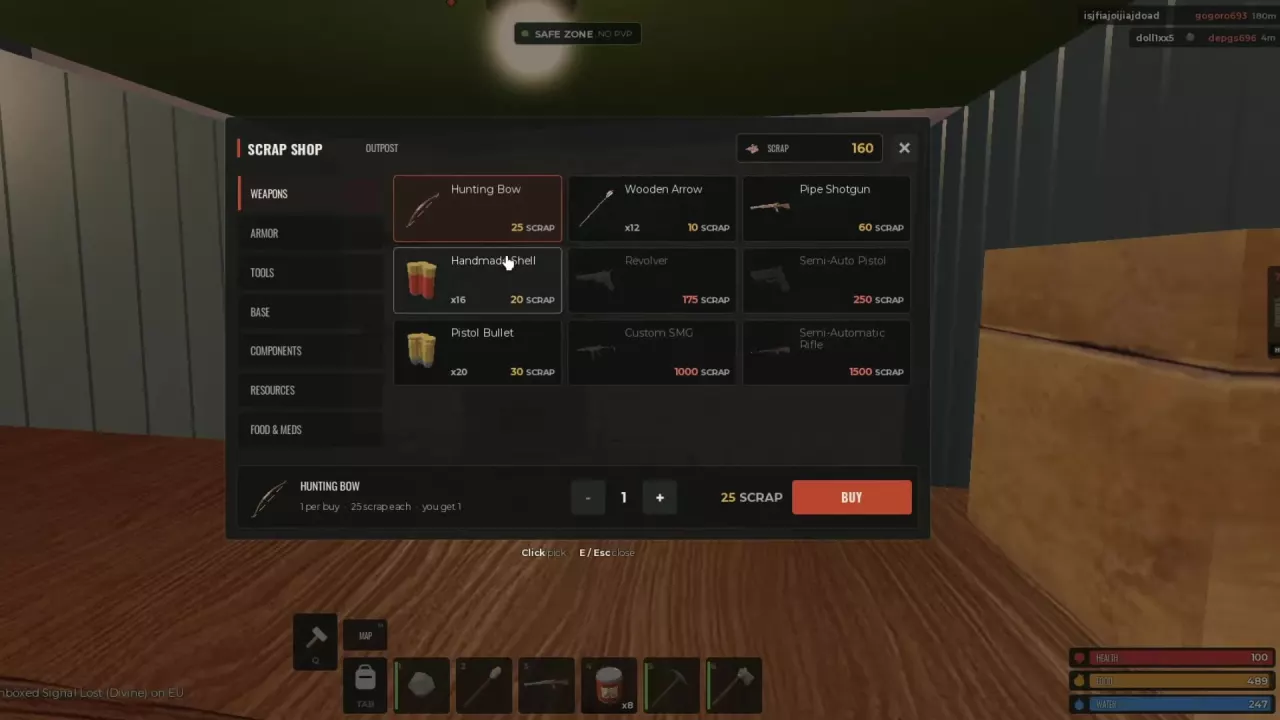
Outpost Scrap Shop with Weapons selected, quantity controls, and the BUY button.

Fust Survival Scrap Shop: 5x Weapon Prices and Purchases

These 5x Scrap Shop budgets include one weapon and matching ammunition:

Purchase Total
Hunting Bow + 12 Wooden Arrows 35 Scrap
Pipe Shotgun + 16 Handmade Shells 80 Scrap
Revolver + 20 Pistol Bullets 205 Scrap

If you already own a usable gun, prioritize the ammunition it lacks instead of buying another weapon.

At Outpost's Shopkeeper, open Weapons, select the item, adjust quantity and press BUY. Ammunition purchases use packs, so account for both the pack size and price when adjusting quantity.

Events

Events

Fust Survival Events: Airdrops, Double Rates and Hunts

  • Regular Airdrop: Occurs every 45 minutes. Read the server announcement and use the map to locate the drop area.
  • Double Rates: Lasts 20 minutes when active. Gathering from trees, rocks, ore, corpses and pickups yields twice as much; barrel and crate loot is also doubled. Choose a gathering or loot route for your current shortage.
  • Pumpkin Hunt: Press Y to JOIN or N for NOT NOW on its invitation. Read the start countdown before deciding.

Fust Survival Dino Hunt: T-Rex Fight, Rewards and Leaving

Dino Hunt runs every 2 hours. Once the panel says JOINED, wait for the teleport and fight T-Rex with the other hunters.
  • Receive victory rewards: Stay through the victory and return countdown. Rewards arrive after returning; if your inventory is full, a bag appears at your feet that only you can open.
  • Leave early: Hold J during the fight to leave and forfeit rewards.
  • Account for reclaimed equipment: Leaving the event takes back its issued gun and half of your unused event ammunition. Keep this rule in mind when planning supplies for your next trip.

Skins & Customization

Skins & Customization
Skins menu with Weapon Crates, Shard information and daily reward panels.

Fust Survival Skins, Shards and Character Appearance

  • Earn Shards: Play time, NPC kills, large events, daily login rewards and duplicate Weapon Crate skins can supply cosmetic currency.
  • Craft item skins: Open SKINS > CRAFT for gun, armor and Rock cosmetics.
  • Restyle your base: Use the Tool Cupboard for base-skin unlocks and whole-base styles. Changing a base skin preserves its health and building tier.
  • Choose your Survivor carefully: Once you CONFIRM the appearance, it stays locked until the next wipe.
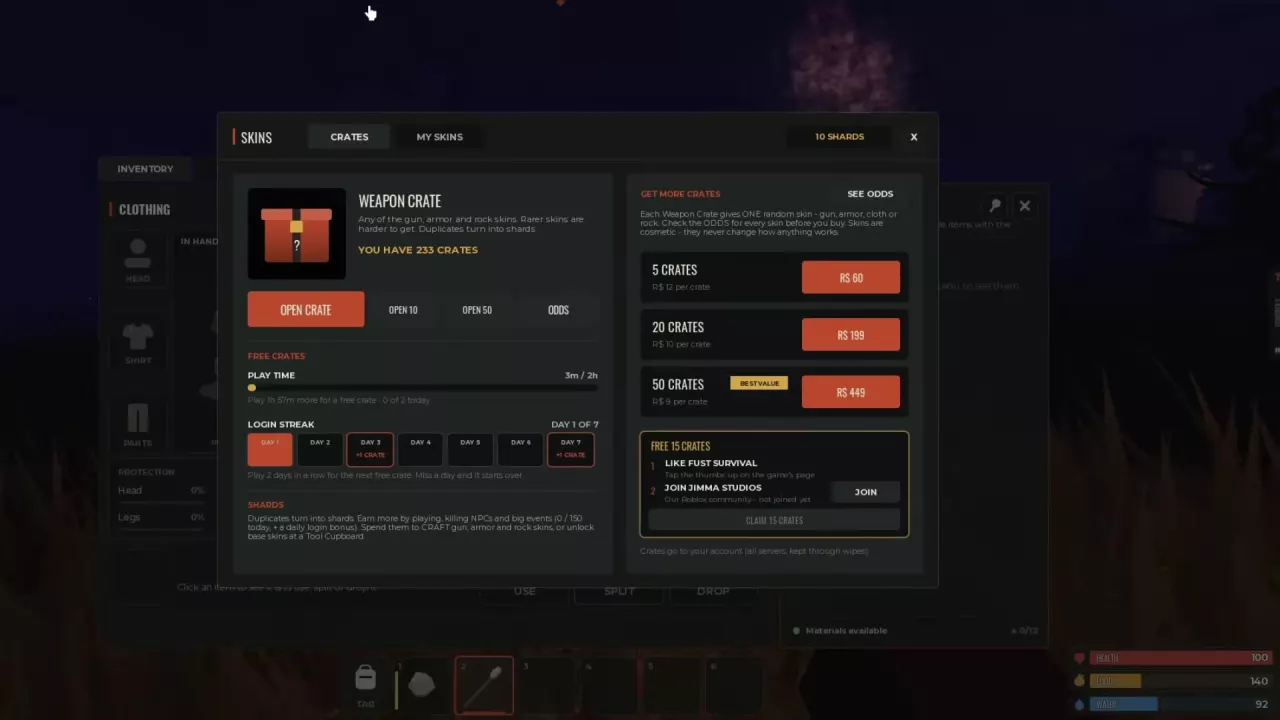
Weapon Crate menu showing opening options, free rewards and purchase packs

Fust Survival Weapon Crates: Free Rewards, Prices and Odds

Each Weapon Crate gives one random cosmetic skin. Duplicates convert into Shards, and opening more crates does not improve the chance on each opening.

Free reward routes include:

  • Play Time: One crate every 2 hours, up to two per day.
  • Login Streak: One crate on day 3 and another on day 7. Missing a day resets the streak.

Open Inventory > Skins > CRATES to access crates and inspect ODDS. These cosmetic crates belong to your account and remain across servers and wipes.
Passes & Kits

Passes & Kits

Fust Survival Game Passes: VIP, Kits and Cosmetic Bundles

  • VIP — 500 Robux, one-time purchase: Prioritizes server access through VIP slots or queue priority, adds exclusive servers and Crown cosmetics, and includes one Weapon Crate daily.
  • Starter Bundle — 399 Robux: A limited-time cosmetic offer available once per account. It includes Blueprint and Forge animated Divine gun skins, matching door, box, Sleeping Bag and armor skins, 25 Weapon Crates and 1,500 Shards.
  • Starter Kit — 99 Robux: A separate purchase for repeatable equipment and building supplies on Modded servers. Choose it for survival supplies rather than the Bundle's cosmetic collection.
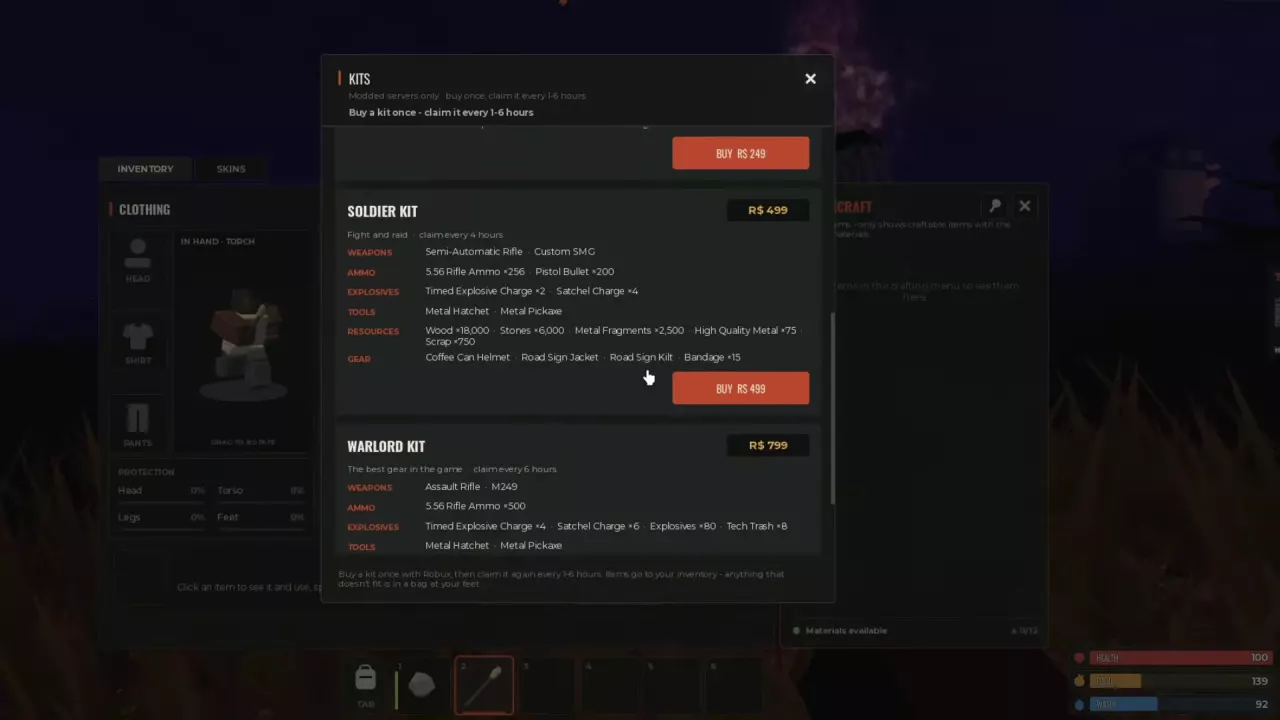
KITS menu with the Modded-only notice, kit purchase buttons and inventory overflow instructions.

Fust Survival Kits: Contents, Claim Rules and Best Fits

  • Starter: An armed first-base start with stone tools and building resources.
  • Survivor: Metal gathering tools, Revolver and Pipe Shotgun.
  • Soldier: Semi-Automatic Rifle and Custom SMG with combat and raiding supplies.
  • Warlord: Assault Rifle, M249 and the largest rifle-ammunition and explosive supply of these four kits.

Claims are available only on Modded servers. Open KITS and use your owned kit's current availability status to determine when you can claim. Warlord is unavailable for the first 2 hours after a wipe. Supplies enter Inventory; collect any overflow from the bag at your feet.

Updates

Scripts

External.wtf

An external tool shown with player information overlays and an aim-radius display in Fust Survival.

Megasic DLC

A Fust Survival script with aiming, player tracking, and visual customization features.

OP Vault

A Fust Survival script interface with aim settings and a target information panel.

Solace

A Fust Survival script featuring player and NPC information overlays and a moderator indicator.

Tomboy.Hook

A Fust Survival tool that displays information about players and items during gameplay.

Vault

A Fust Survival script with player tracking visuals and an aiming interface.

Recent articles

Fust Survival official artwork

Fust Survival Modded Weapon Tier List

Choose the best Fust Survival Modded weapons for repeated fights, scoped shots and rooftop combat, with SMG comparisons and budget alternatives.

FAQ

Is survival progress shared between servers?

Survival progress saves separately on each server. Rejoin the same server to continue before its weekly wipe; bases and loot reset at that wipe. Account-owned Weapon Crates remain across servers and wipes. See the wipe and save rules.

Why can I open a Tool Cupboard but not upgrade the base?

Key access and building authorization are separate. Open AUTHORIZED PLAYERS and use AUTHORIZE before using UPGRADE BASE. On Solo servers, each TC permits one authorized player, so an occupied authorization slot can block another player. See TC authorization.

Why won't my recovered gun fire?

Recovering a gun does not refill it. Check loaded and reserve ammunition: an empty magazine with matching reserves needs R to reload, while 0/0 with NO AMMO means you need to obtain ammunition first. Use the ammo compatibility and resupply guide to choose the right rounds.

Can I claim a purchased gear kit on a Vanilla server?

No. Gear-kit claims are available only on Modded servers. Open KITS there and claim when your owned kit is available. Warlord also cannot be used during the first two hours after a wipe. See kit claim rules for the schedules and contents.