Fust Survival Crafting, Workbench Levels and Repairs
Last updated:
Craft basic supplies wherever you have the materials, then place workbenches to access more advanced recipes. Use the recipe requirements and queue messages to resolve blocked crafts and keep production moving.
Recipes and Crafting Facilities
| Recipe or task | Materials and access | Details |
|---|---|---|
| Building Plan | 20 Wood; no workbench required | Building pieces, costs and upgrades |
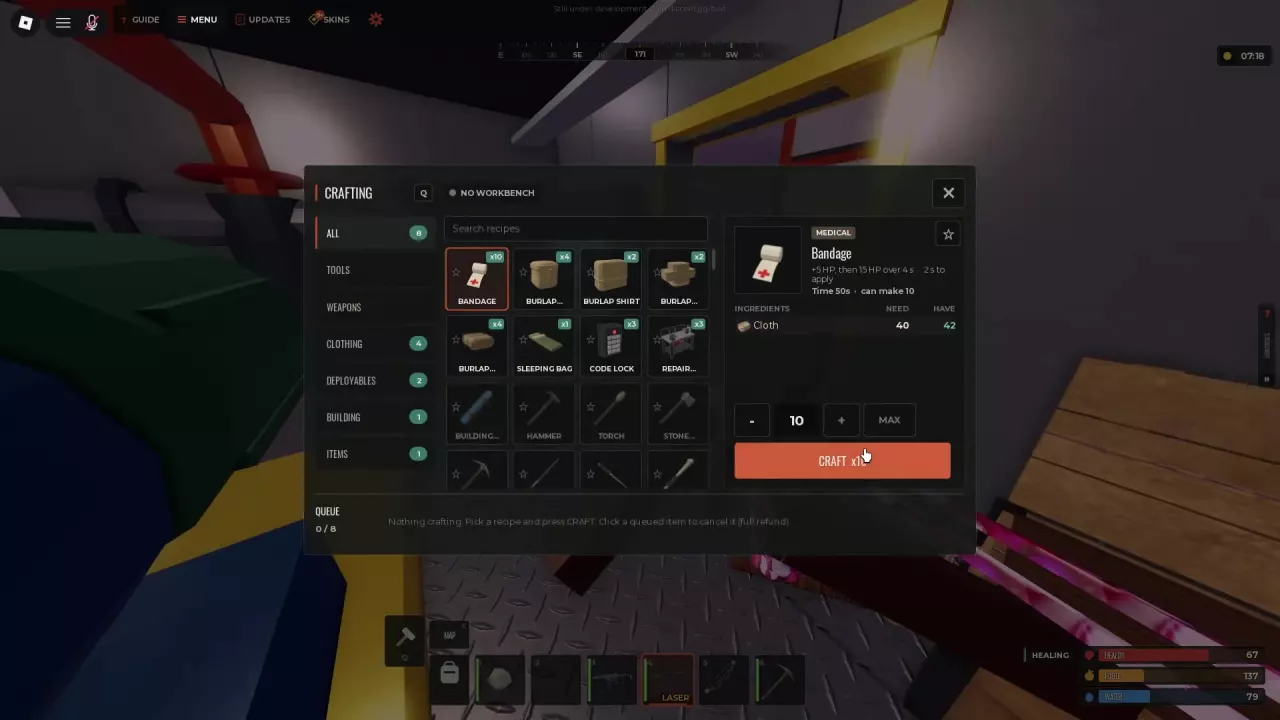
| Bandage | 4 Cloth per Bandage; no workbench required | Healing and Bandage use |
| Hunting Bow | 200 Wood + 50 Cloth on the 10x server; no workbench required | Weapons, recipes and acquisition |
| Wooden Arrow | 25 Wood + 10 Stones produces 2 arrows; no workbench required | Ammo recipes and resupply |
| Handmade Shell | 5 Gun Powder + 5 Stones produces 2 shells | Shells and Gun Powder |
| Furnace | 200 Wood + 400 Stones + 100 Cloth on the 10x server | Smelting, fuel and collection |
| Shelves | 150 Wood + 25 Metal Fragments and WB1 access on the 10x server | Storage boxes and shelf layouts |
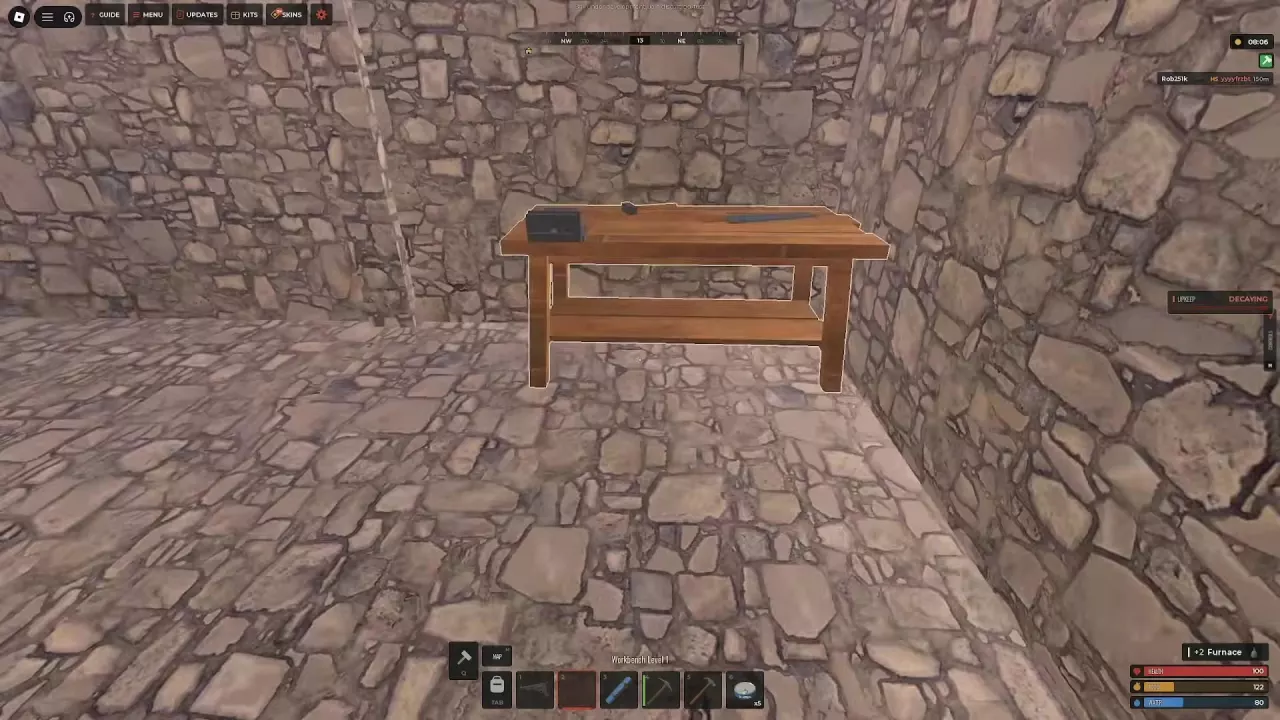
Workbench Level 1 provides access to WB1 recipes, including the Revolver, Crossbow and Gun Powder. Workbench Level 2 is required for recipes such as the Custom SMG and 4x Scope. A Repair Bench restores worn tools and melee weapons at a material and maximum-durability cost.
You can make a Building Plan, Hunting Bow, Wooden Arrows and Bandages while the menu says NO WORKBENCH, provided you have the required materials.
Find a Recipe and Start a Batch
- Press Q to open Crafting.
- Search for an item by name or browse All, Tools, Weapons, Clothing, Deployables, Building and Items.
- Select the recipe. Check its ingredients, output, crafting time and workbench requirement. Carry enough materials and move into range of the required workbench before starting.
- Use −, + or MAX to choose the batch size. If NOT ENOUGH RESOURCES appears, gather the missing materials or reduce the quantity.
- Click CRAFT. The batch enters the queue, and completed items trigger acquisition notifications.
The quantity selector counts recipe repetitions. A recipe that produces multiple items gives more finished items than the selected number: Wooden Arrow produces 2 arrows per craft, so five repetitions produce ten arrows. Check the output beside the item name before choosing a batch.
Queue Limits, Cancellation and Full Inventory
The queue has eight slots, and each slot can hold a batch containing more than eight items. Follow the remaining quantity, progress bar and timer to track production. You can close Crafting and keep moving, search loot or open storage while crafting continues.
Click an item in the queue to cancel that queued entry for a full material refund. If INVENTORY FULL appears, free inventory space so the queue can resume producing items.
Batch size and crafting time
| Bandage batch | Material cost | Displayed total time | Conditions |
|---|---|---|---|
| 10 Bandages | 40 Cloth | 50 seconds | Oil Rig crafting setup; MAX selected 10 with 42 Cloth available |
| 46 Bandages | 184 Cloth | 23 seconds | 10x-server batch |
Both batches use 4 Cloth per Bandage, but their timers differ with the gameplay conditions. Use the timer for your selected batch rather than applying one crafting speed to every server. The 46-item batch also demonstrates why eight queue slots do not limit you to eight finished items.
Add Recipes to Quickcraft
- Open Crafting with Q and click the star on a recipe to favorite it.
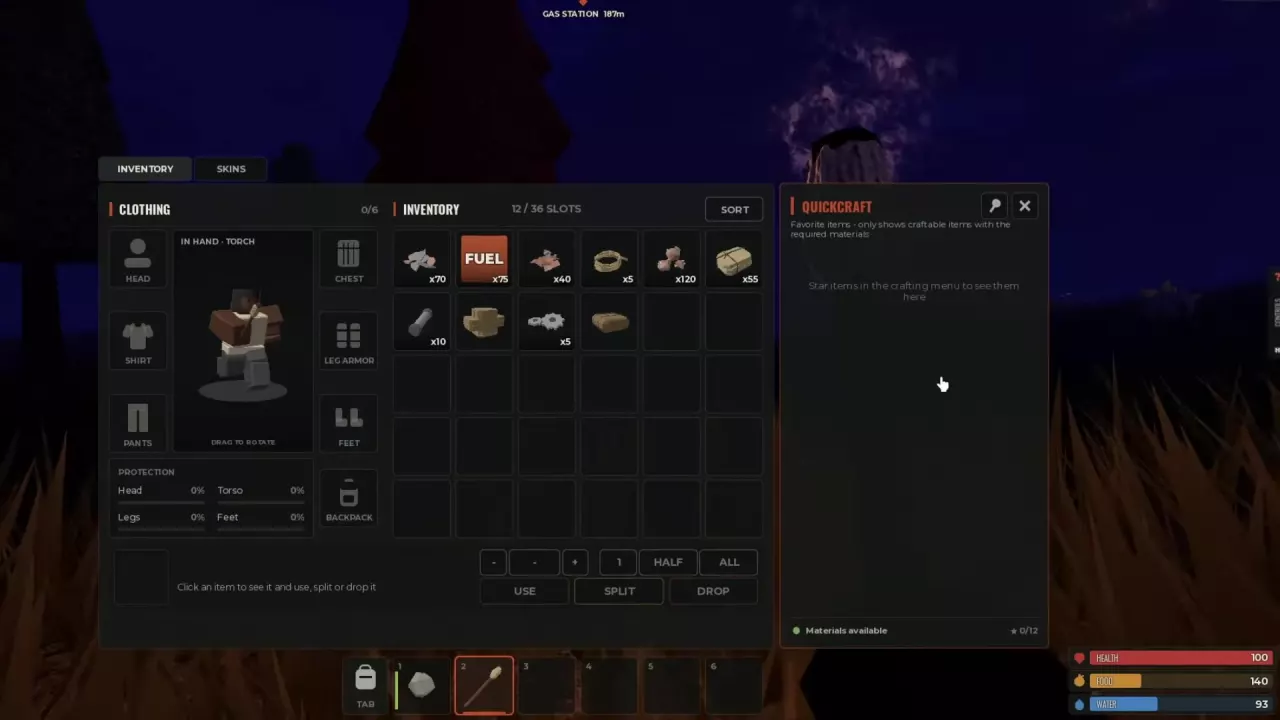
- Press Tab to open Inventory and find the Quickcraft panel.
- When you have the recipe's materials, click its CRAFT button in Quickcraft.
Quickcraft supports 12 favorites and filters them by the materials you currently carry. An empty panel has two common causes:
- No favorites: star recipes in Crafting first. The favorites counter can show 0/12.
- Favorites without enough materials: collect the ingredients for those recipes so they can appear.
Building Plan, Wood Storage Box, Hunting Bow and Wooden Arrow are useful favorites if you regularly make building supplies or replace basic equipment.
Workbench Levels and Recipe Access
Workbenches range from Level 1 to Level 4. A recipe's WB1, WB2 or WB3 label identifies its workbench requirement. Having the ingredients alone does not satisfy that requirement: a Revolver still needs WB1 access.
| Recipe requirement | Recipes |
|---|---|
| WB1 | Revolver, Crossbow, Gun Powder, Grenade, Landmine, Reflex Sight, Bone Helmet, Barbed Wire, Floor Grill, Bed, Wardrobe, Wall Mount |
| WB2 | Custom SMG, Tactical SMG, Drum SMG, 3x ACOG, 4x Scope, Laser Sight |
| WB3 | SCAR, Silencer |
Additional shortened recipe labels include RED DOT…, MUZZLE… and VERTICAL… under WB1; SEMI-AUTOM… under WB2; and ASSAULT… and BOLT ACTIO… under WB3.
WB1 is a useful early target when you want craftable weapons, Gun Powder or more base furnishings. WB2 becomes relevant when you want the listed SMGs or optics; SCAR and Silencer recipes call for WB3. See the weapon directory for weapon acquisition and the ammo guide for ammunition requirements.
Craft and place Workbench Level 1
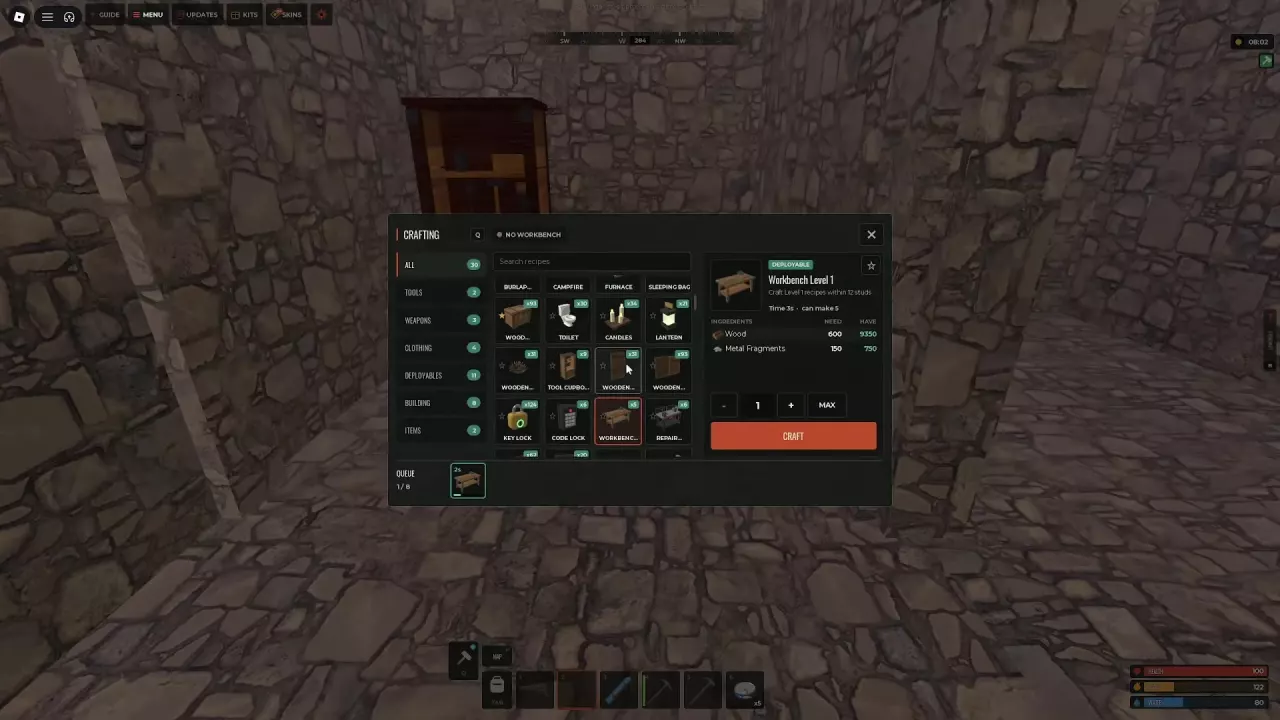
- On the 10x server, carry 600 Wood and 150 Metal Fragments.
- Open Crafting, select Workbench Level 1 and click CRAFT. This recipe displays 3 seconds.
- Place the completed workbench inside your base.
- Stand within 12 studs of it to craft Level 1 recipes, with the recipe materials in your inventory.
Place the bench near the spot where you prepare equipment so you can stay within its crafting range. To pick up a placed bench, aim at it and press E when PICK UP appears.
Level 1 and Level 2 workbenches can also be recovered from storage boxes that contain them. For a supply of Metal Fragments, use Furnace smelting.
-
Workbench Level 1
- Level
- 1
-
Workbench Level 2
- Level
- 2
Repair Bench Costs and Durability Tradeoffs
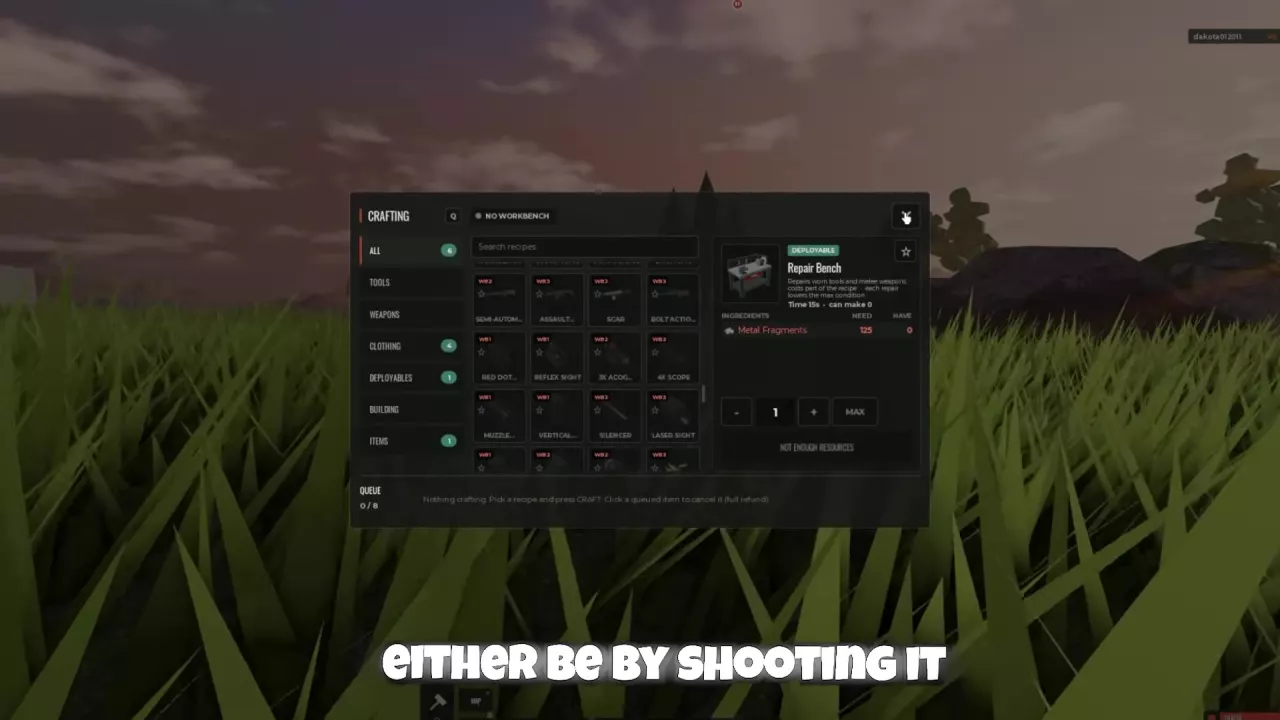
Open Q → Deployables → Repair Bench. Crafting the bench costs 125 Metal Fragments and takes 15 seconds.
A Repair Bench repairs worn tools and melee weapons. Each repair consumes a portion of the item's recipe materials and lowers its maximum durability. Repairing lets you keep using an existing item, but repeated repairs leave it with a progressively lower durability ceiling.
When your Rock displays BROKEN, the game directs you to a Repair Bench. If you already have a replacement gathering tool, switching to it can save repair materials and avoid investing further in the worn Rock. Compare your options in the gathering tools guide.
Building-piece repairs use the Hammer; see building repairs and upgrades for that separate task.
-
Repair Bench
- Type
- Deployable
- Repairs
- Worn tools and melee weapons