
Fust Survival Wipes: Schedule, Saves and Resets
Last updated:
Plan your next Fust Survival session around your server's wipe and see which progress you need to rebuild.
Friday Wipes and Your Server Countdown
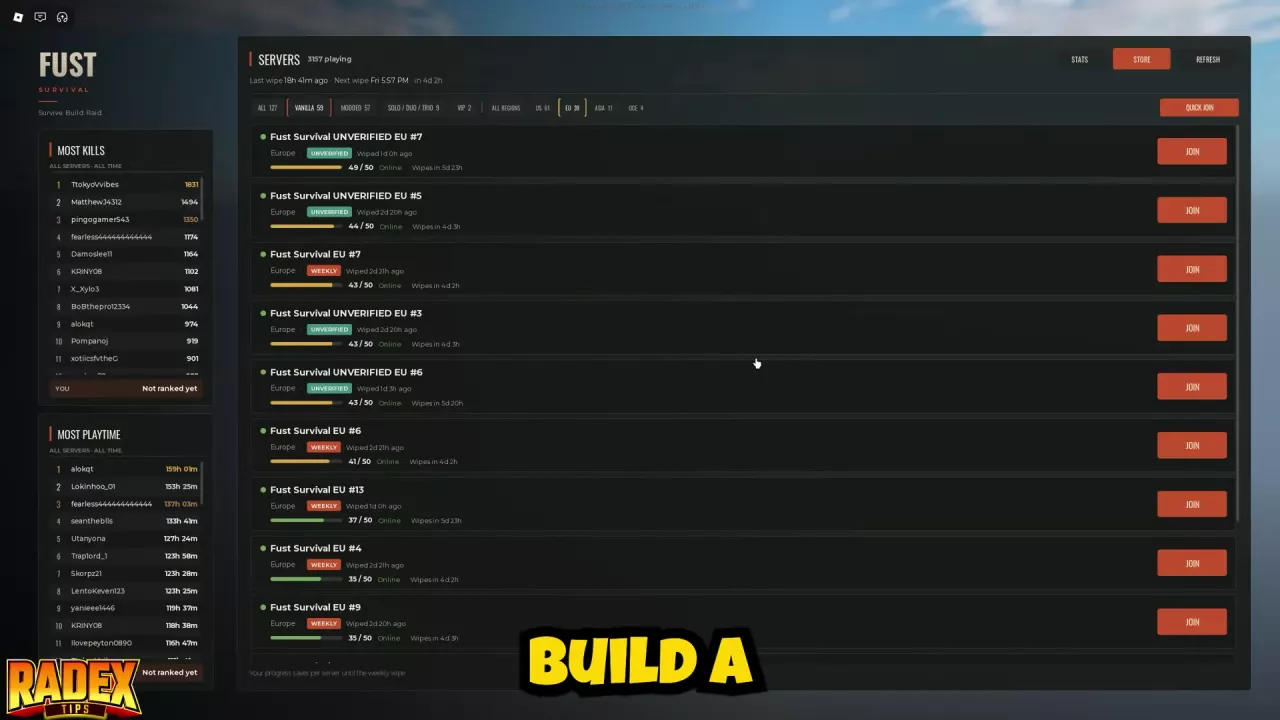
Fust Survival's weekly wipe day is Friday. The beginner guide lists a wipe time of 16:57 UTC, but use your own server's countdown to plan around its next wipe.
Open the server list and find your server. Its row shows when it last wiped and a Wipes in countdown. Check the server name as well as the countdown when returning to an existing save. For help choosing a region or mode, see the server guide.
What Resets and What Carries Over
| Progress or benefit | What happens at a wipe? |
|---|---|
| Bases and loot | Reset; rebuild your base and collect supplies again. |
| Weapon Crates | Belong to your account and remain across servers and wipes. |
| Purchased gear kits | Ownership is permanent after a one-time purchase, so you can claim the kit again under its claim rules. Supplies claimed before the wipe are server loot and are not preserved by kit ownership. |
Weapon Crates are cosmetic reward boxes, distinct from loot stored on a server. See Weapon Crates for ways to obtain and open them.
Returning to a Server and Starting a New Wipe
Before the wipe, return to the same server to continue its saved survival progress. A different server has its own survival state.
After a wipe, gather supplies and build a new base. If you are setting your Survivor appearance, choose carefully: once confirmed, it stays locked until the next wipe. The beginner guide covers the route from the beach to a working first base.
Owned gear kits can be claimed on Modded servers when available. Warlord Kit cannot be claimed during the first two hours after a wipe. See the kit guide for claim rules and loadouts.