
FUSTSURVIVAL WIKI
Inventory & Storage

Fust Survival Storage Boxes and Shelf Layouts

Last updated:

Choose enough storage for your trips and arrange your base supplies so you can find them quickly.

Carried Storage and Base Storage

Your personal inventory has 36 slots. A Small Backpack adds a separate 12-slot container, while a Large Backpack adds 50 slots. Click the equipped backpack slot to open its contents separately from your main inventory.

Boxes stay at your base for surplus supplies; Shelves let you arrange boxes across three levels. For equipping and collecting backpacks, see backpack capacity and pickup.

Backpacks
NameExtra slotsSources
Small Backpack
12 slots (Equipped in the BACKPACK slot.)
Military Crates and dropped player belongings. (Military Crate examples include Dome and Oil Rig.)
Large Backpack
50 slots (Equipped in the BACKPACK slot.)
Elite Crate loot and dropped player belongings.

Small Backpack

Type
Wearable backpack
Equipment controls
Drag into the BACKPACK slot to wear; the item tooltip also offers right-click or double-click to wear. Click the equipped slot to open; right-click or drag out to take off.
Ground controls
E OPEN; F PICK UP.
Storage controls
Quick Stack, Sort, and Take All.
Pickup feedback
Pickup can display “Your back is full - empty this backpack first.” E OPEN remains a separate way to inspect and transfer contents. (Ground-backpack pickup attempt while a Small Backpack is equipped.)

Large Backpack

Type
Wearable backpack
Equipment controls
Wear in the BACKPACK slot and click that slot to open. Right-click or drag out to take off.
Ground controls
E OPEN; F PICK UP.
Storage controls
Quick Stack, Sort, and Take All; scroll to reach items farther down the container.
Blocked pickup
If pickup asks you to empty the backpack, open it, remove its contents, then retry F PICK UP. (The rooftop example is collected after removing two Tactical SMGs and one Custom SMG.)
Storage Boxes
NameCapacity
Wood Storage Box
18 slots
Large Wood Box
100 slots

Wood Storage Box

Type
Base storage container
Wood required
100 Wood (Quickcraft recipe on the 10x server.)
Open
Aim at the box and press E OPEN.
Storage controls
Quick Stack [K], Sort [L], and Take All; supports individual, half-stack, drag, and Ctrl-hover transfers.
Lock access
A box fitted with Key Lock displays G KEY LOCK beside E OPEN. (Key Lock fitted.)
Fits on each level of
2 × Shelves (Two Wood Storage Boxes per level.)

Large Wood Box

Type
Base storage container
Open
Aim at the box and press E OPEN.
Pick up
F PICK UP. (Aim at a placed box displaying the pickup prompt.)
Storage controls
Quick Stack, Sort [L], and Take All. Scroll to browse the contents and hover to inspect individual items.
Quick Stack key
K (Interfaces displaying QUICK STACK [K].)
X (The alternate container-control layout during the 10x server run.)
Placement controls
Left mouse button places, R rotates, and holding Shift enables free placement. Aim at Shelves to select a shelf level. (Holding the box placement preview.)
Placement feedback
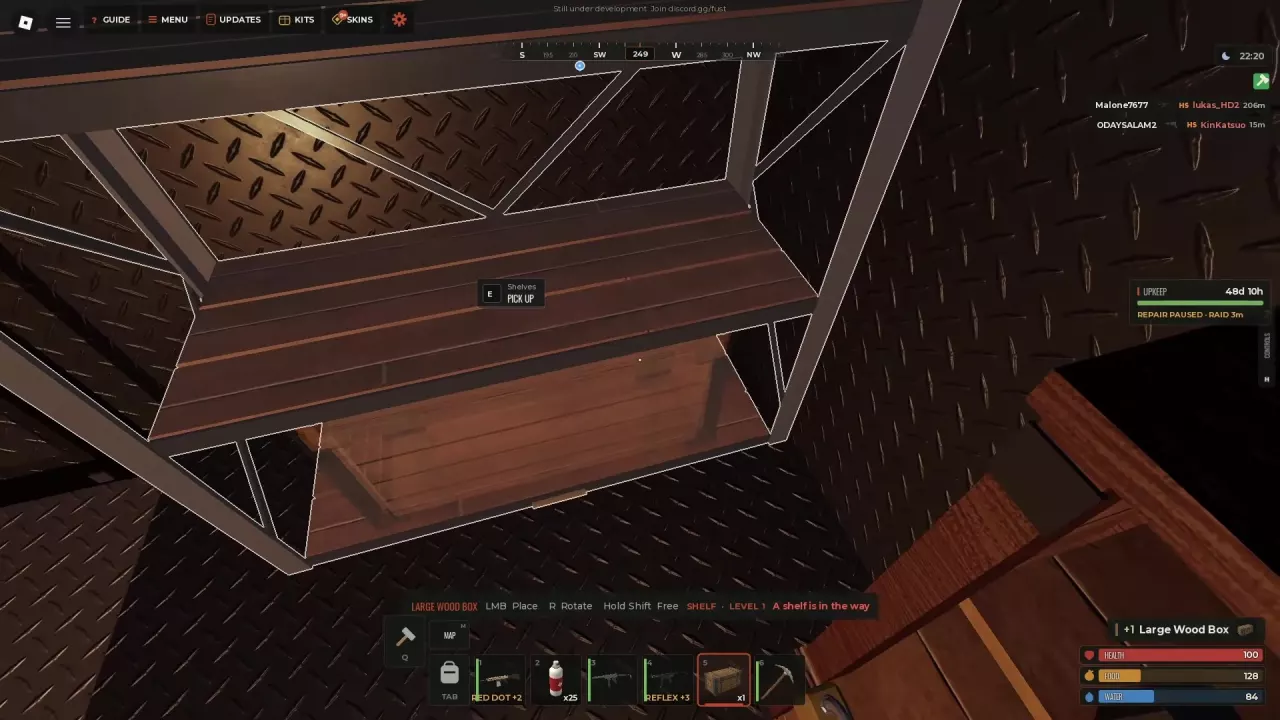
Shelf snapping offers LEVEL 1, LEVEL 2, and LEVEL 3. Blocked or distant previews can report A shelf is in the way or Too far away. (Placing on Shelves.)
Fits on each level of
1 × Shelves (One Large Wood Box per level.)

Shelves

Shelves

Type
Deployable storage furniture
Shelf levels
3 levels
Wood required
150 Wood (10x server recipe.)
Metal Fragments required
25 Metal Fragments (10x server recipe.)
Crafting time
2 seconds (10x server recipe.)
Workbench level
1 level (Must be within workbench range to start the 10x server recipe.)
Placement controls
Left mouse button places, R rotates, and holding Shift enables free placement.
Placement feedback
The preview supports SNAP: CORNER and can report Needs flat ground or A large box is in the way.
Pick up
E PICK UP. (Aim at placed Shelves displaying the prompt.)
Holds per level
2 × Wood Storage Box (Alternative to one Large Wood Box on that level.)
1 × Large Wood Box (Alternative to two Wood Storage Boxes on that level.)
Requires to craft
25 × Metal Fragments (10x server recipe; also requires 150 Wood and Workbench Level 1.)

Choose and Secure Your Boxes

Start with a Wood Storage Box when you need a small, inexpensive container: its Quickcraft recipe costs 100 Wood on a 10x server. Choose a Large Wood Box when you have substantial amounts of equipment or materials to store.

Aim at a box and press E OPEN to access it. A placed Large Wood Box can also show F PICK UP for repositioning. Install a Key Lock on a box to secure it; you and your team automatically receive keys. See doors, locks and base defense for more on securing your base.

Organize Supplies for the Next Trip

Keep clothing and armor, weapons and tools, and materials in separate boxes. After a trip, deposit the surplus; before leaving again, take a weapon, matching ammunition, clothing and medical supplies.

Open a box with E and move items between the inventory on the left and the box on the right. Use Quick Stack and Sort to organize its contents, and scroll through a large box to find items farther down. Hover over an item to read details such as its name, quantity, condition or attachments. The box counter shows occupied slots: for example, 96/100 is nearly full.

For splitting stacks and other transfer shortcuts, see controls and inventory shortcuts.

Craft Shelves and Place Boxes

On a 10x server, Shelves cost 150 Wood and 25 Metal Fragments, take 2 seconds to craft and require you to be within Workbench Level 1 range.

  1. Select Shelves and position the preview on flat ground. Press R to rotate, hold Shift for free placement, and left-click to place.
  2. Select a storage box and aim at the shelf. Use the preview to choose LEVEL 1, LEVEL 2 or LEVEL 3, adjust its position or rotation, then left-click to place it.
  3. Aim at a placed box and press E to open it.

If the shelf preview says Needs flat ground, move it to a flat surface. If a large box blocks the shelf, reposition the preview or the box. If the box preview says A shelf is in the way or Too far away, adjust the target level, position or distance; hold Shift to use free placement instead of the current snap.
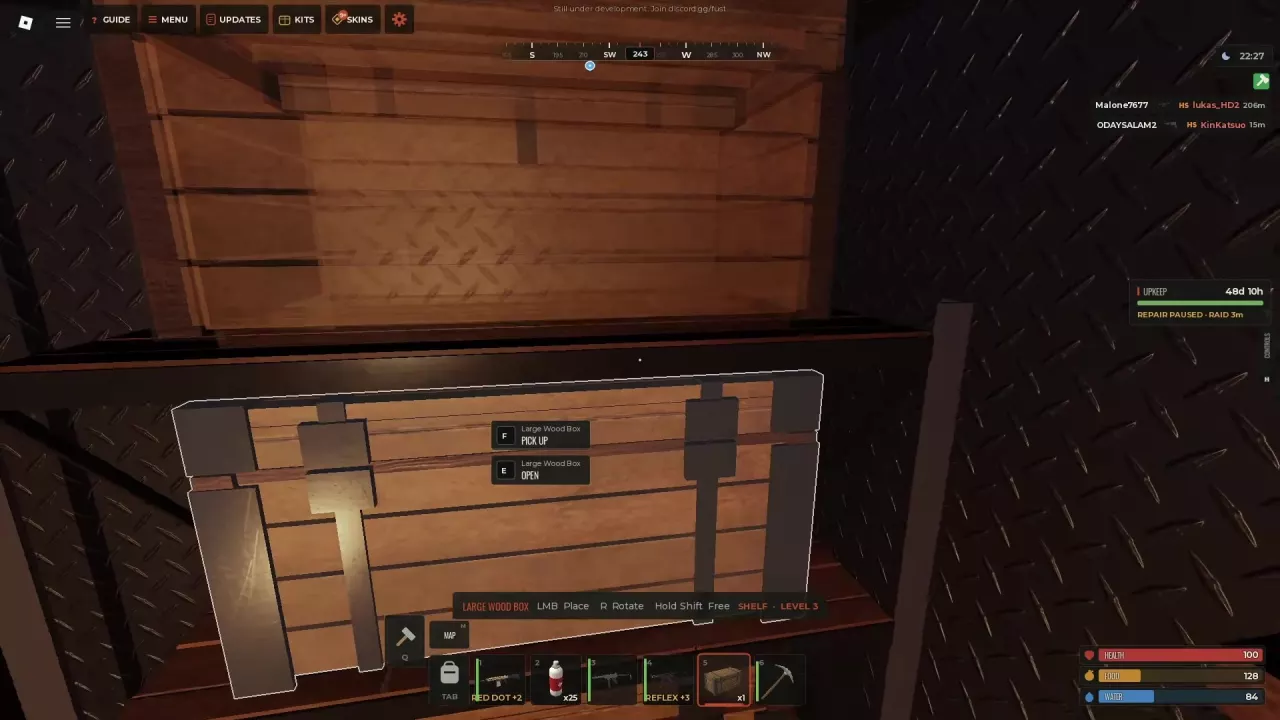
A Large Wood Box placement preview aligned with shelf level 3
A shelf placement preview reporting that a shelf is in the way

Choose a Three-Level Layout

Each shelf level fits two Wood Storage Boxes or one Large Wood Box. Fill all three levels according to how you want to divide your supplies:

Layout Total box slots Best use
Six Wood Storage Boxes 108 More separate containers for sorting categories
Three Large Wood Boxes 300 More space for large collections of gear and materials

These are totals across the boxes on one shelf, not the capacity of a single box or your carried inventory. You can also use different box sizes on different levels to balance separation and capacity.

To rearrange the setup, follow the prompt on the object you are aiming at: a Large Wood Box can show F PICK UP, while Shelves show E PICK UP.