
Fust Survival Servers: Regions, Modes and Joining
Last updated:
Choose a Fust Survival server that fits your region, preferred progression speed and group size. Check its population and wipe countdown before starting a base.
Server Types and Group Limits
Vanilla and Modded describe progression speed. Solo and Duos describe group restrictions, while VIP controls access to exclusive servers. Read these labels together when choosing where to play.
For a two-player team, choose a DUOS listing. On Solo servers, the Tool Cupboard authorization limit prevents both players from being authorized on the same TC.
VIP server access
VIP costs 500 Robux as a one-time purchase and grants access to two server options:
- Fust Survival VIP: Vanilla rules.
- VIP 5X | MODDED: a VIP-only Modded option.
When a server is full, VIP provides access through VIP slots or priority at the front of the queue. Choose it if exclusive servers and joining priority matter to you; see the VIP and game-pass comparison for its other benefits.
Choose a Region and Join
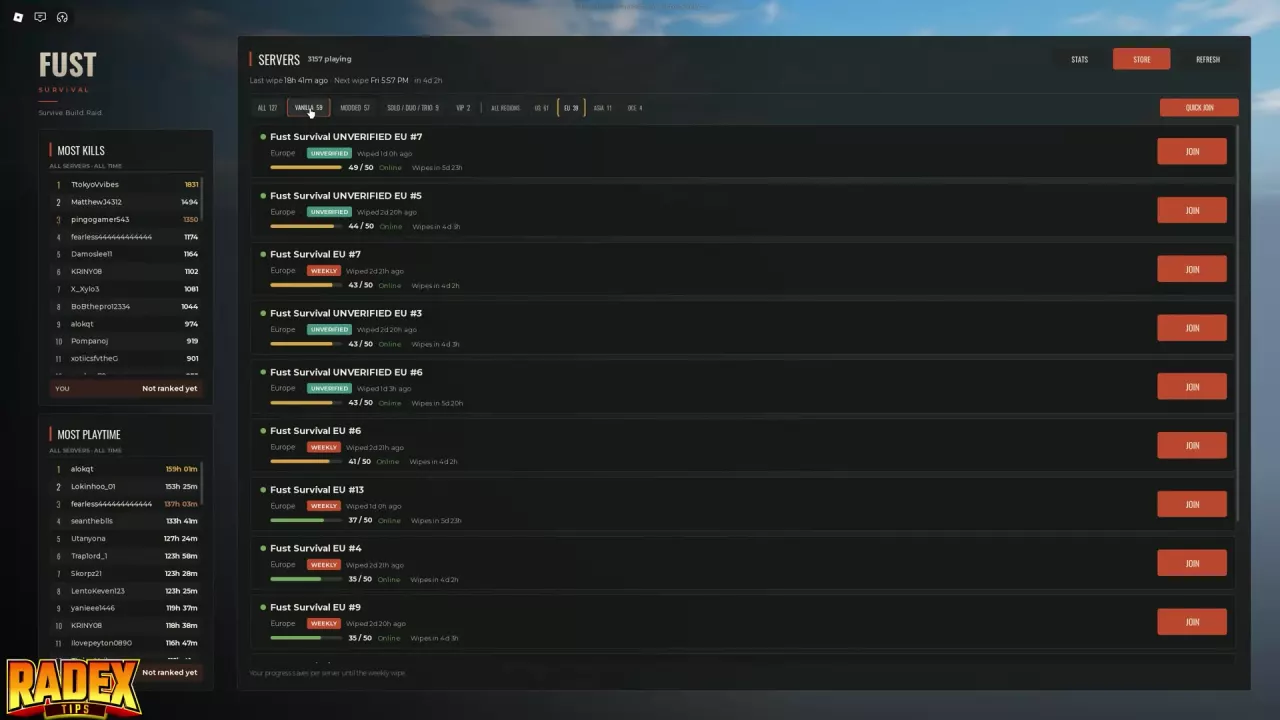
- Open the server list and choose a category: ALL, VANILLA, MODDED, SOLO / DUO / TRIO, or VIP.
- Choose a nearby region: US, EU, ASIA or OCE. Use ALL REGIONS to browse every region. Where a listing specifies US East or US West, use that extra location detail to narrow your choice.
- Compare the listings. Check online status, current players against capacity, server labels, last-wipe information and the next-wipe countdown. Read group limits and progression settings before joining.
- Click JOIN beside the server you want. A joining message names the server as you connect. QUICK JOIN is also available; use the individual JOIN button when you want a specific server.
Start with a nearby region to reduce latency, then choose the population and rules that suit your session. Once you arrive, follow the beginner guide to your first base if you are starting fresh.
Vanilla and Modded Progression
- Choose Vanilla for standard progression. It suits players who want the regular pace of gathering materials, crafting equipment and developing a base.
- Choose Modded to reach resources and equipment sooner. This is useful when you want faster progress during a shorter session, but opponents can also acquire powerful gear sooner. Faster gathering does not make the server inherently easier.
The UNVERIFIED 5X | MODDED configuration lists 5x gather, 5x loot, 5x craft and 5x stacks. Those settings affect several parts of progression, so compare the full settings line rather than choosing by the server name alone.
Fust Survival 10X #2 | MODDED is another named option. Treat its 10X name separately from the four settings listed for the 5X configuration; the 5X settings are specific to that configuration.
Check the Wipe Before Committing
Survival progress saves per server until its weekly wipe. Return to the same server to continue that progress; switching servers does not carry over a shared survival state.
The weekly wipe day is Friday. Find your intended server in the list and read its last-wipe information and next-wipe countdown. If you want time to build and develop a base, favor a server with more time remaining. Bases and loot reset at the wipe; the wipe schedule and reset guide explains what resets and what carries over.
If a purchased gear kit is part of your plan, choose a Modded server for its claims. Warlord Kit is unusable for the first two hours after a wipe, so joining immediately after a reset does not give immediate access to that loadout. See kit contents and claim rules before choosing a server around a kit.